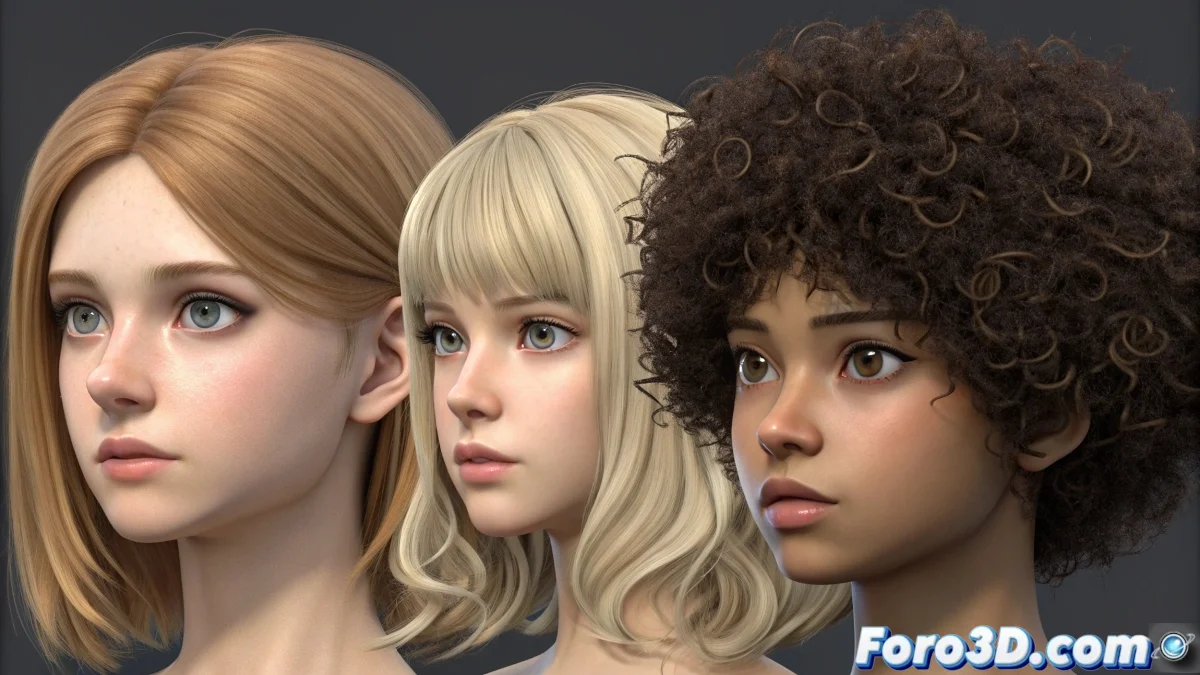
When Hair Decides to Always Be the Same
The challenge of creating different hair types in Blender is one of those processes that seems simple until you realize that the particle system has very firm opinions about how the hair should behave. The frustration is understandable when you always get that same straight hair that looks like it just came from the hairdresser, no matter what you try. The secret lies in understanding that hair in Blender is not just one thing, but a combination of multiple systems working in harmony.
You've reached the crucial point where you discover that straight hair is just the default starting point, and to achieve variety you need to master a series of interconnected parameters that control everything from the base shape to the final behavior of each strand.
Base Setup for Different Hair Types
The first step is to understand the four fundamental parameters that control the hair shape. In the particle properties, go to the Hair Length tab and adjust Random for length variation. Then in Children, enable Interpolated or Simple depending on the density you need.
For curly hair, the Kink parameter is your best ally. Enable Kink with type Curl or Radial and adjust Amplitude and Frequency to control the intensity and density of the curls. Combine it with Roughness in the children tab to add natural disorder.
- Hair Length Random for length variation
- Kink with Curl type for defined curls
- Roughness for disorder and naturalness
- Interpolated Children for realistic density
Good digital hair is like a good hairstyle: it requires layers, texture, and that touch of controlled messiness
Specific Techniques by Hair Type
For wavy hair, use Kink with Wave type and low amplitudes (0.1-0.3) with medium frequencies (2-4). Add Roughness Endpoint around 0.05-0.1 to smooth transitions. This approach creates natural waves without the excess structure of perfect curls.
Afro hair requires a different approach. Use Kink Radial with high amplitude (0.5-0.8) and low frequency (0.5-1.5). Combine it with high Roughness Uniform (0.3-0.6) and Size Random for thickness variation. The key is to create volume without apparent order.
- Wavy: Kink Wave with low amplitudes
- Afro: Kink Radial with high amplitude
- Curly: Kink Curl with medium-high frequency
- Straight: No kink, low roughness
Using Textures for Advanced Control
Textures are essential for granular control. Use Voronoi or Noise textures on the Density parameter to create areas of greater or lesser hair concentration. This is particularly useful for hair with receding hairlines or sparser zones.
To control the shape, apply textures to Length and Thickness. A Gradient texture on thickness can simulate finer tips, while a Noise texture on length creates natural variation in strands.
- Voronoi textures for density control
- Gradient on thickness for fine tips
- Noise on length for natural variation
- Blackbody on color for tonal variation
Realistic Materials and Finishes
The hair material is as important as the shape. Use the Hair shader in Cycles or the Principled Hair BSDF in Eevee. For dark hair, adjust Melanin to 0.8-1.0, for blondes 0.1-0.3. The Random Color parameter adds essential tonal variation for realism.
Transmissibility is key for light hair. Increase Transmission to allow light to pass through the strands, creating that natural shine effect that characterizes real hair.
- Principled Hair BSDF for full control
- Melanin for natural base color
- Random Color for tonal variation
- Transmission for light hair
Styling and Grooming Techniques
The Edit mode of the particle system is your most powerful tool. Use Comb to direct the hair flow, Cut to adjust lengths, and Puff to add volume. Always work from general to specific: establish the general shape first, then refine specific areas.
For complex hairstyles, consider using multiple particle systems. One system for the base, another for specific strands, and a third for flyaways and loose hairs. This separation gives you individual control over each hairstyle element.
- Comb for direction and flow
- Cut for length adjustment
- Puff for volume and body
- Multiple systems for layer-by-layer control
Mastering these techniques will transform you from a victim of straight hair to a digital hair artist, capable of creating everything from soft beachy waves to lush afros. Because in Blender, even the most rebellious hair can learn to take the shape you imagine with the right parameters 😏
Quick Settings by Type
Base values to start with:
Straight: No kink, Roughness 0.01
Wavy: Kink Wave, Amp 0.2, Freq 3
Curly: Kink Curl, Amp 0.4, Freq 6
Afro: Kink Radial, Amp 0.7, Freq 1