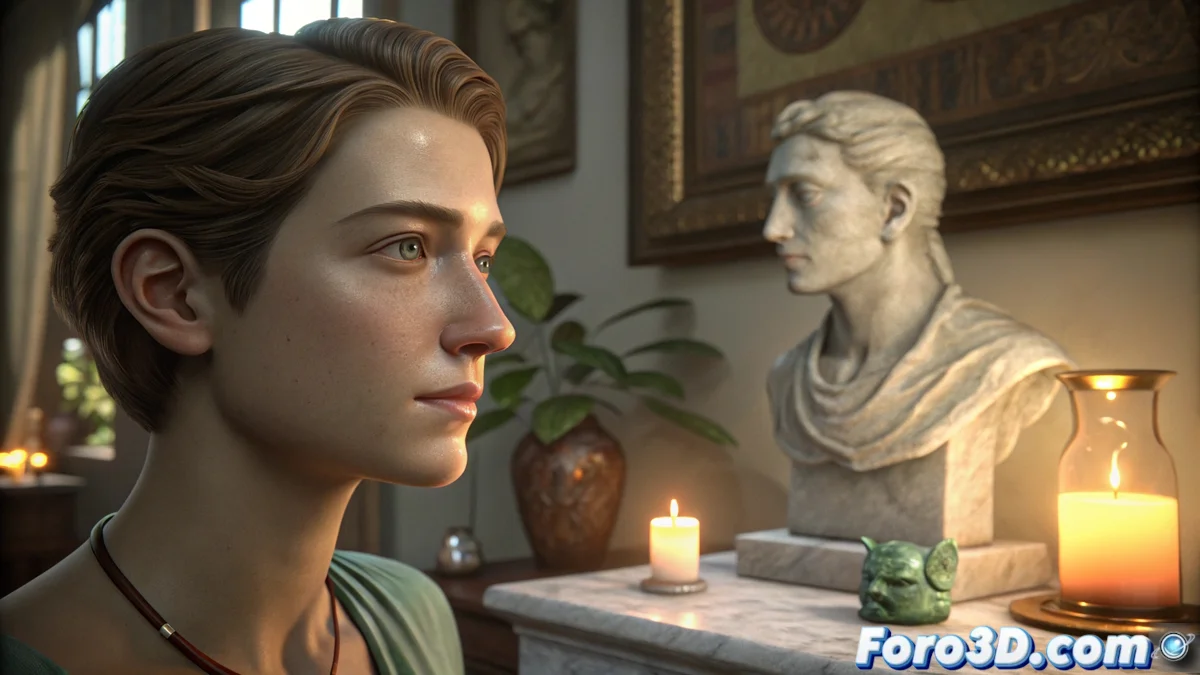
Subsurface scattering: simulates how light penetrates translucent materials
In 3D rendering, making certain materials appear realistic depends on an essential optical phenomenon. It's not enough for light to bounce off the surface; it must penetrate, travel beneath it, and exit elsewhere. This process is what generates the internal warmth and softness of human skin, where the edges of ears or the tip of the nose are tinged with light. Without simulating it, materials would seem opaque and hard, like plastic, losing their organic quality. 🎨
Materials that require simulating subsurface scattering
Not all translucent materials scatter light the same way. Human skin is the most complex case, with multiple layers that absorb and diffuse light differently. Other common examples include candle wax, marble under backlighting, milk, or jade. Each material has a unique thickness and density that defines how and how much light scatters inside it. To replicate this faithfully, rendering engines use specific shaders that calculate this light journey beneath the surface.
Key application examples:- Skin and organic tissues: Essential for realistic characters, avoiding a plastic or waxy appearance.
- Food and natural materials: Like milk, butter, or jade, where light diffuses characteristically.
- Decorative lighting elements: Like candles or marble translucent lamp shades.
Accurately simulating how light scatters beneath the surface is indispensable for achieving realism in characters or organic objects.
How to implement the effect in your render
3D rendering programs implement this effect through algorithms that approximate the light's trajectory within the material's volume. The artist must define key parameters:
Main parameters to configure:- Scatter radius: Controls how far the light travels beneath the surface before emerging.
- Subsurface color: Determines the tint the light acquires when scattering inside the material.
- Material density: Affects how the light attenuates while traveling inside.
Rendering with SSS (Subsurface Scattering) requires more processing time due to the complexity of the calculations. To speed up the process, there are approximation techniques like screen-space SSS, which calculates the effect in image space, though with less physical accuracy. ⚙️
Common error and how to avoid it
A frequent mistake is applying an excessive scatter value. This doesn't improve realism; instead, it turns a character into a waxy figure that seems to melt under the light, rather than looking like a living being. The key is to adjust moderately the parameters, observing real reference materials to guide the scatter and color values. Mastering this balance is what separates a good render from an exceptionally realistic one. 🎯