Guide to Creating Joints and Animating a Folding Chair in 3D
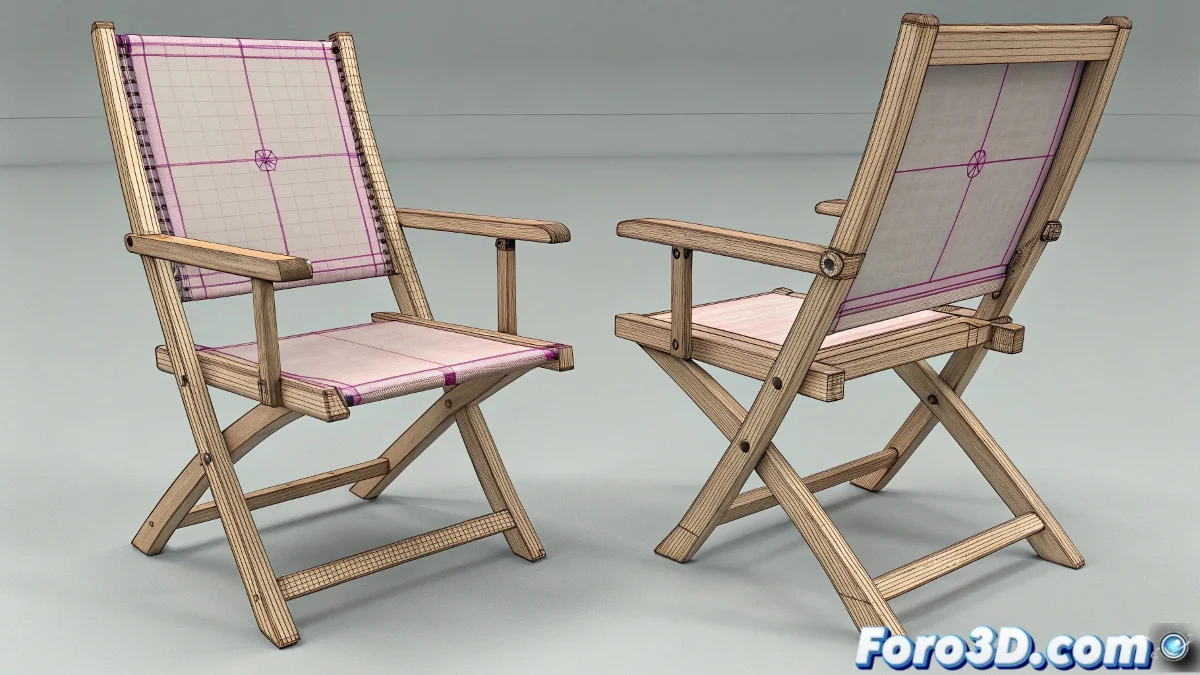
When faced with animating a mechanical object like a folding chair, the key is to understand the joints well and how to connect them so that the movement of one piece correctly influences the others. In 3ds Max, this type of animation can be approached in several ways, from the classic hierarchy to bone systems (bones) or even using specific controllers for mechanisms. The reference image with the magenta points indicating the pivot points is an excellent guide for defining those joint points.
Pivot and Hierarchy Setup for Smooth Mechanical Animation
First, make sure to correctly place the pivot of each piece right at the point where it should rotate, which in your case are the magenta crosses. This is fundamental because any animation will depend on these pivots for the rotation or movement to be realistic. In 3ds Max, you can use the pivot adjustment tool (Affect Pivot Only) to move it without modifying the object's position.
Then, the hierarchy between objects plays a crucial role. You must group or link the objects so that, when moving or rotating the main piece, the subordinate pieces follow the natural movement. For example, the chair base will be the parent of the legs, and the legs in turn parents of the folding supports, according to the structure. It's like assembling a puzzle where each piece must fit perfectly! 🧩
Using Bones and Controllers to Facilitate Animation
Although 3ds Max has a bone system designed for character animation, it can also be used for mechanical objects. Creating a basic skeleton that follows the chair's structure can facilitate animation, as long as each bone is correctly aligned with the rotation points.
Another advanced technique is to use controllers like the IK (inverse kinematics) system or link constraints, which allow automating the interaction between pieces. For example, when moving the base, the controllers will make the rest of the pieces move accordingly without needing to manually animate all the keys.
Recommendations for Animating Without Creating All Keys Manually
- Animate only the main pieces: Let the controllers or hierarchies do the rest.
- Use animation curves: To smooth movements and avoid rigid motions.
- Set up scripts or simple expressions: To automate certain repetitive behaviors.
Experiment with plugins or scripts available on foro3d.com that facilitate the creation of animated mechanisms.
If you ever feel like the folding chair is animating itself and not letting you work, don't worry: it's probably that 3ds Max decided it's time for you to take a break and have a coffee. Or that the chair wants to sit for a while without you! ☕