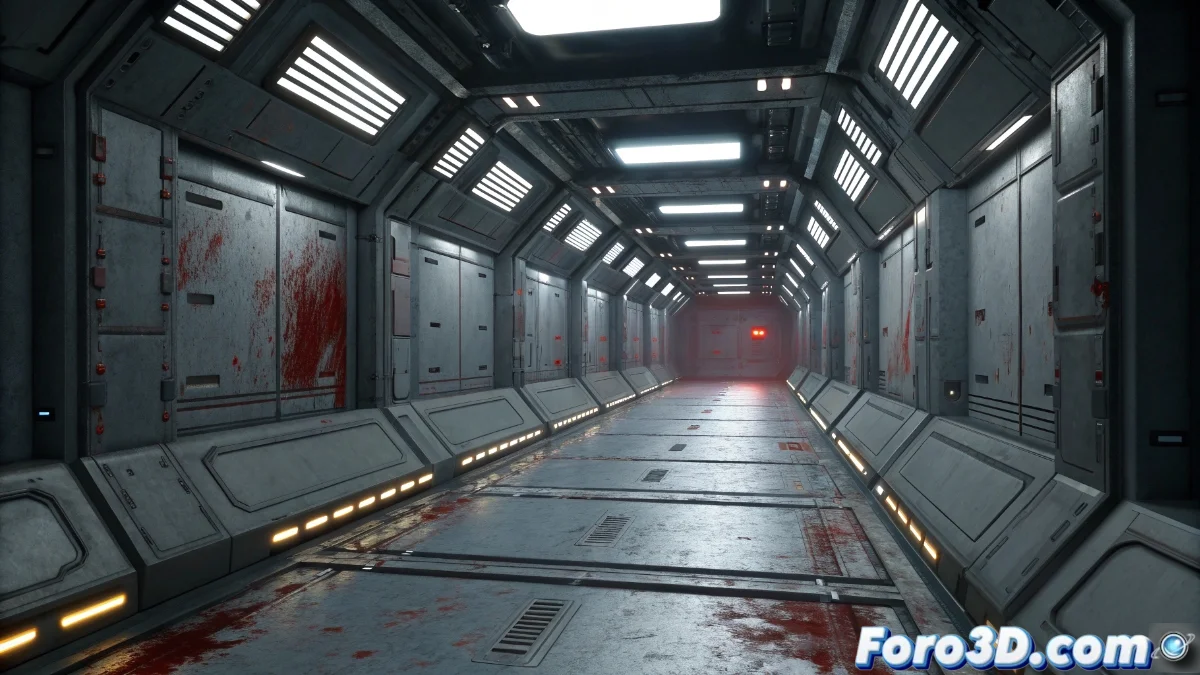
Decal Actors in Unreal Engine: Application and Optimization of Surface Details
Decal Actors in Unreal Engine are an essential tool for incorporating complex visual details without needing to modify the geometric mesh of objects. They function as digital stickers that project textures onto compatible surfaces, adding realism through effects like stains, graffiti, bullet holes, or wear. Their implementation is especially useful in environments that demand immersion without compromising performance with detailed geometry 🎨.
Essential Setup and Properties
When integrating a Decal Actor into the scene, it's possible to adjust various parameters that influence its appearance and behavior. The size determines the projection's reach, while the orientation defines the application angle on surfaces. The material used must be configured in the Decal domain to ensure proper blending with receiving objects. Managing the render order is crucial when multiple decals overlap, as it affects display priority and prevents unwanted artifacts.
Key properties to consider:- Decal Size: Controls the area of influence of the projection on surfaces
- Orientation and Angle: Adjusts how the texture adapts to the object's geometry
- Material with Decal Domain: Allows for correct visual integration without distortion
Proper configuration of Decal Actors not only improves realism but also optimizes the artistic workflow in complex projects.
Optimization Strategies and Best Practices
To ensure optimal performance, it is advisable to limit the number of decals visible at the same time and implement distance-based fading systems. The materials used should be as simple as possible, avoiding complex operations that slow down rendering. Proper configuration of collision masks prevents incorrect projections onto unwanted objects, and the use of texture atlases allows combining multiple effects into a single material, reducing the number of draw calls.
Optimization recommendations:- Simultaneous Decal Limit: Avoids visual saturation and performance impact
- Simplified Materials: Reduces shader complexity for greater fluidity
- Precise Collision Masks: Controls which surfaces the decals project onto
Final Considerations and Common Challenges
Although Decal Actors are extremely versatile, they can occasionally exhibit unpredictable behaviors, such as projecting in unexpected locations (for example, onto the sky or floating in empty space). These reminders that even the most advanced tools have their rebellious moments underscore the importance of careful design and configuration. Mastering their use allows for enriching scenarios with believable details without sacrificing efficiency 🚀.