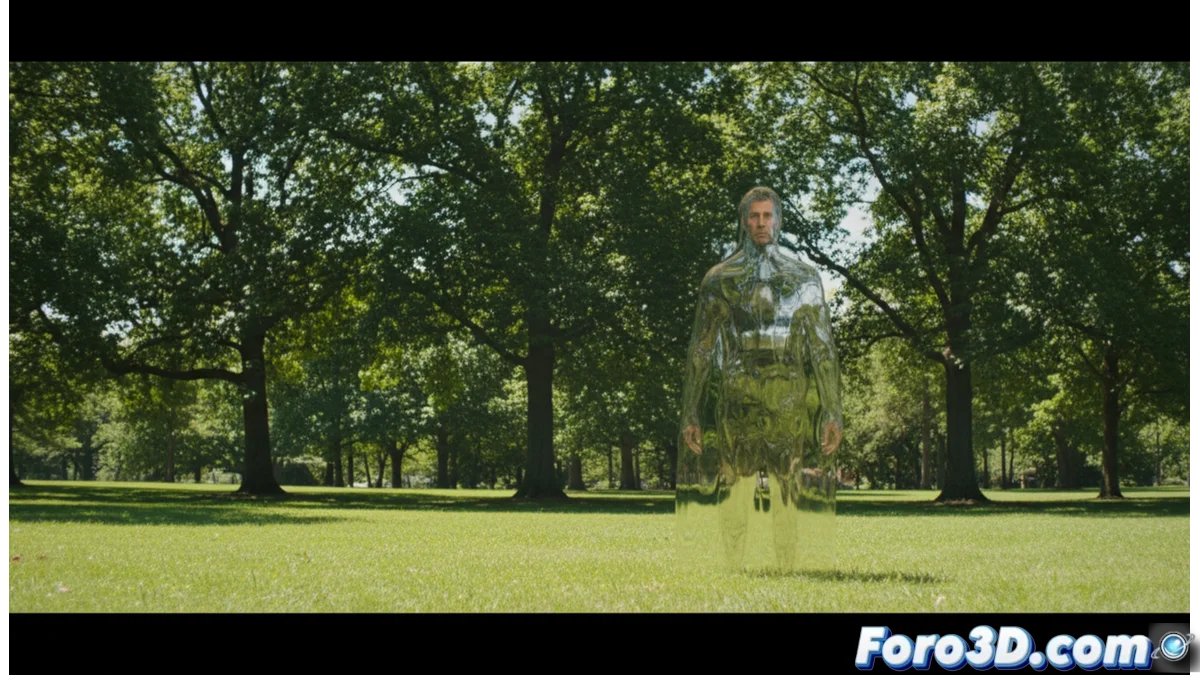
Creating the Shining Man Effect in Blender with Pencil 2D
The legend speaks of a presence that is barely visible, a figure whose only sign is a distortion in the air around it. This phenomenon, similar to active camouflage or the vapor rising from the pavement on a hot day, challenges perception. Recreating this optical illusion in Blender involves simulating how light bends as it passes. 🌀
Prepare the Scene Environment
To start, open Blender and set up a basic composition. Add a plane to serve as the ground. It is recommended to use a park model or landscape with some trees as the background. Set up clear and directional lighting, similar to a sunny day, so that any subsequent alteration in the image is easy to perceive. Place a simple mesh, such as a basic human figure or a cube, at the point where you want the entity to be. This object will be the core of the distortion effect.
Key elements of the base scene:- Ground and background: An extensive plane and an environment like a park with trees to provide context.
- Sunlight: A powerful and directional light source that casts defined shadows.
- Core object: A simple mesh (mannequin or cube) that marks the position and shape of the entity.
The goal is not to make the man visible, but to make it believable that he was always there, camouflaged in plain sight.
Implement the Pencil 2D Shader for Distortion
Select the mesh that represents the silhouette. In the Shader Editor, create a new material and add the Pencil 2D node. This special shader does not render its own geometry, but deforms and distorts everything seen behind it. Connect its Color output to the material's Surface input. The visual effect is mainly controlled from the node's properties.
Main Pencil 2D node configuration:- Strength: Adjust the deformation intensity. Try values between 0.5 and 1.5 for a subtle but perceptible effect.
- Size: Modify this parameter so that the distortion is perceived as a wide and diffuse silhouette, not as a localized point.
- Animation: To simulate the figure moving or flickering, slightly animate the Strength and Size values using keyframes.
Achieve the Final Believable Effect
The success of this effect lies in subtlety. The figure must be defined by how it deforms the environment, not by having a solid appearance. Adjust the camera position and render the scene to check that the distortion integrates naturally with the background. Experiment with the distance between the core object and the landscape elements to vary the effect intensity. The final result should be an elusive entity that the viewer discovers by noticing an anomaly in the air, not by seeing a concrete object. 👁️