Cars and trucks autodrive system

3dpoder - 03/11/2009 08:11
[size=3]Cars and trucks autodrive system v7.0 for Blender v2.49b. A simple and eficient setup allowing automated animation forcars and trucks, on all kinds of roads and Terrain.[/size]
blend file todo tests.

Philippe roubal. 3d-synthesis, com Cars and trucks autodrive system 7.0 for Blender v2.49b. 27/10/2009. This setup is released under Creative Commons by 2.0 license. France.
special gracias and credits :
To litteneo (jérôme mahieux) for the whelsrotation, py script, released under copyleft license. Littleneo is the author of the famous script open city engine, generating amazing procedural cities. You can find this script on his website : Jerome, le, chat, free, fr.
warning :
Pléase type Alt+p with the cursor in the text window below and run the animation from frame 1 todo activate the script.
features of this setup :
-Altitude sensors allowing driving on bumpy roads, with slopes and Bridges. This setup is more versatile than previous versións, but the geometry of the chasis may not be so accurate on very bumpy Terrain. For specific 4x4 animations, you can use instead my 4x4 autodrive system, available on my website.

Only one Empty todo move todo animate the car: empty-front. This Empty can be keyframes by hand, driven on a curve by using a Clamp todo constraint, or parented todo an other Empty driven by a Clamp todo constraint, or Even animated by a script (openster). In the blend file provided with this tutorial, the empty-front is parented todo empty-guide, which is driven on the curve by a Clamp-to constraint.

Speed control by an unique ipo curve applied todo the empty-guide.
-4 independent whels with dynamic suspensión.
-tires deformation.
-automated animation of the stering whel.
-automatic transversal slope in curves.
-trajectory easily editable in top view by editing a simple curve.
-fine secondary animation of the car body available th rouge the car body itself and the two empties empty-whelsdroprear and empty-whelsdropfront.
-very light setup :
-4 empties (empty-guide is not necessary). Only 2 empties if secondary animation is not required.
-1 lattice.
-9 solid objects. Only 7 if secondary animation is not required on the rear whels. Only 6 if you tires deformation is not required (in this case you can a los remove the lattice).
-just add the visible objects : car body, whels, stering whel.
note : the rear whels are be parented todo the objects Rim-rear. R and Rim-rear. L, but they can a los be parented todo the object chasis, either directly todo the object itself or by vertex parenting, using vertex groups as reference.

The front whels are parented todo the objects ster-left and ster-right. The rear whels copy the z location of the external rear vértices of the object sensor, and the ster-left and ster-right objects copy the z location of the external front vértices of the object sensor (vértices in the four corners).
layers :
Layer 1 : car Rig and whels, layer 2 : car body and stering whel.

Layer 3 : road and road curve, layer 4 : bridge, layer 5 : lamps and cameras, layer 11 : character, helmet and glasses, layer 12 : armature of the character, layer 13 :
Layer 14:
some explanations about the setup :
-The Purple object named ster-pointer has two vértices in two groups. They are used as tracking targets todo control the transversal slope of the suspensión object and the rotation of the stering whel.

Select the inboard Camera todo se the rotation of the stering whel (can be adjusted by the influence factor of the tracking constraint).
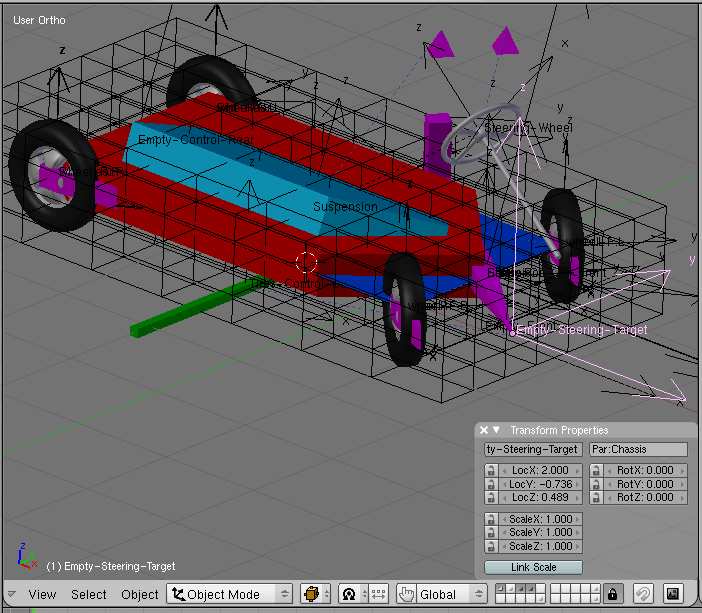
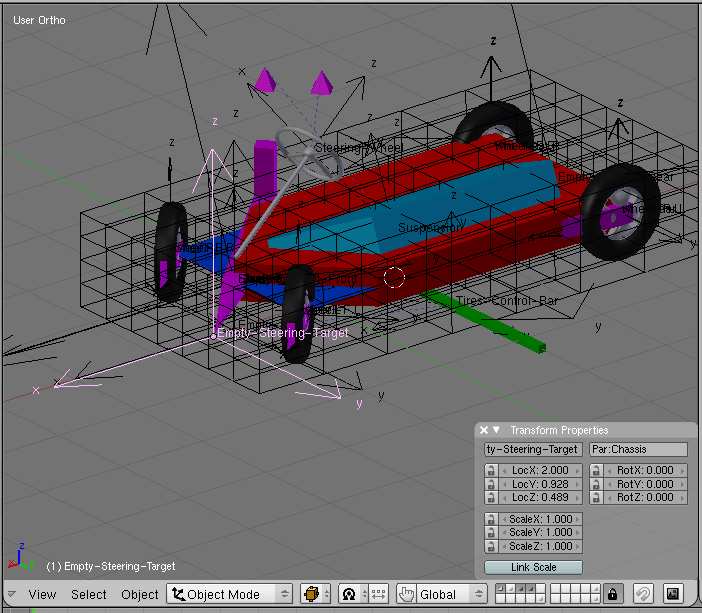
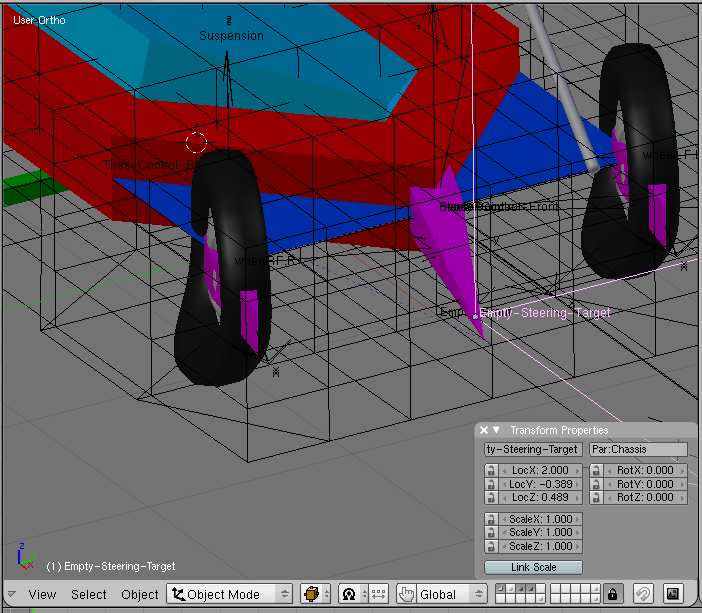
use of the empty-stering-target :
This Empty has a very important function. It is used todo control the stering. The object name ster-pointer is locked on the z axis tracking the empty-stering-target.

The location of the empty-stering-target can be defined in two manners. In the current blend file, this Empty is parented todo the chasis of the car, and afected by a negative time offset (-1.5 frame). As the distance between the chasis and the Empty vary with the speed this time offset has todo be ajusted each time you make an important modification in the speed of the car. If you use a curve as a trajectory guide for the car, you can apply todo the empty-stering-target a Clamp todo constraint, as you do for the empty-guide, or the empty-front. By moving the Empty along the curve, you can adjust the distance between the chasis and the empty. As they are driven by the same Loc IPO, this distance Will remain constant independently of the speed.
use of empty-guide and empty-front :
Empty-front can be used alone todo move the car. It can be either keyframed or driven on a curve th rouge a Clamp todo constraint.

For my o, y prefer todo use one more empty. So i have added empty-guide. Empty-front is parented todo empty-guide. The goal of empty-guide is todo ACT as a relay. This Empty gives more Freedom when animating. This relay allows todo drive several Cars on the same curve for example, allowing them todo have diferent behaviours and trajectories, Although sharing the same curve and ipo.

-- IMÁGENES ADJUNTAS --
🖼️

Estamos trabajando para mostrar las imágenes del foro

Adjunto #116843

3dpoder - 03/11/2009 08:47
[size=4]construction of the car rig[/size]
step 1 : chasis following an empty.

First, add a Cube and name it chasis. Subdivide it one time.


🖼️

Estamos trabajando para mostrar las imágenes del foro

Adjunto #116710


-Then, scale it in z direction : sy0.2.


🖼️

Estamos trabajando para mostrar las imágenes del foro

Adjunto #116711


-In top view, select all the vértices of the Cube on the right side of the screen.


🖼️

Estamos trabajando para mostrar las imágenes del foro

Adjunto #116712


-Scale todo 0 in y direction and remove doubles.


🖼️

Estamos trabajando para mostrar las imágenes del foro

Adjunto #116713


-In object mode, bring the center of the chasis object on the scaling center.


🖼️

Estamos trabajando para mostrar las imágenes del foro

Adjunto #116714


-In Edit Mode, select the vértices on the left of the screen.


🖼️

Estamos trabajando para mostrar las imágenes del foro

Adjunto #116715


-Extrude two times of -1 Blender unit.


🖼️

Estamos trabajando para mostrar las imágenes del foro

Adjunto #116716


Now, the chasis object has the shape of an arrow head.
-select the center vertex at the rear side of this arrow, in the vertex layer set at half height of the Mesh.


🖼️

Estamos trabajando para mostrar las imágenes del foro

Adjunto #116717


-Create a vertex group including only this vertex, give it a weight of 1.0, and name it tail.


🖼️

Estamos trabajando para mostrar las imágenes del foro

Adjunto #116718


#008b-select the vertex at the opposite side of the arrow. This vertex is located at the location of the object center.


🖼️

Estamos trabajando para mostrar las imágenes del foro

Adjunto #116719


-Create a vertex group including only this vertex and name it no sé.


🖼️

Estamos trabajando para mostrar las imágenes del foro

Adjunto #116720


#009c -in front Ortho view, select the two vértices in the middle height of the Mesh, just before the center object location.


🖼️

Estamos trabajando para mostrar las imágenes del foro

Adjunto #116721


🖼️

Estamos trabajando para mostrar las imágenes del foro

Adjunto #116722


-Extrude on the right of 1 Blender unit in the direction of the object center.


🖼️

Estamos trabajando para mostrar las imágenes del foro

Adjunto #116723


note : these two vértices are only useful if you create a car Rig that Will be used on a flat Ground. If you are going todo use the Rig on a bumpy Terrain, we Will use the corners of the sensor plane for the whels location.

As we ned only the vértices, you can deleete the two Edges that you have just extruded.


🖼️

Estamos trabajando para mostrar las imágenes del foro

Adjunto #116724


note : dont forget todo remove these vértices later if they are not used or no more neded.
-in object mode, select the chasis and bring the 3d cursor on its center.


🖼️

Estamos trabajando para mostrar las imágenes del foro

Adjunto #116725


-Add an empty. Name it empty-front. And give it a size of 2 Blender units. -make the empty-front the parent of the chasis.


🖼️

Estamos trabajando para mostrar las imágenes del foro

Adjunto #116726


-In top view, add a plane centered on the center of the chasis object.


🖼️

Estamos trabajando para mostrar las imágenes del foro

Adjunto #116727


-Scale the right side of the plane todo bring the Edge on the empty-front location.


🖼️

Estamos trabajando para mostrar las imágenes del foro

Adjunto #116728


-Typing k, Cut the plane in the middle.


🖼️

Estamos trabajando para mostrar las imágenes del foro

Adjunto #116729


-Typing Control + and Control + shift+f, divide the 2 Faces into 4 triangles. The Edges separating the triangles make an arrow head in the direction of the empty.


🖼️

Estamos trabajando para mostrar las imágenes del foro

Adjunto #116734


-Extrude the left side of the plane 3 times of 1 Blender unit each time.


🖼️

Estamos trabajando para mostrar las imágenes del foro

Adjunto #116735


-Select the center vertex at the rear side of this plane (opposed todo the empty-front).


🖼️

Estamos trabajando para mostrar las imágenes del foro

Adjunto #116736


-Create a vertex group including only this vertex, give it a weight of 1.0, and name it tail.


🖼️

Estamos trabajando para mostrar las imágenes del foro

Adjunto #116737


-Select the center vertex at the front side of this plane (at the empty-front location).


🖼️

Estamos trabajando para mostrar las imágenes del foro

Adjunto #116738


-Create a vertex group including only this vertex, give it a weight of 1.0, and name it no sé. -in object mode, make the chasis the parent of this plane.


🖼️

Estamos trabajando para mostrar las imágenes del foro

Adjunto #116739


-Name the plane sensor. Select the chasis, and add a track todo constraint. In the file target, type sensor, in the field vg (vertex group), type tail. To = -x, up=z. Leave world space in the two cspace choices.


🖼️

Estamos trabajando para mostrar las imágenes del foro

Adjunto #116740


-Select the empty-front and move it around. You Will notice that the chasis and the sensor plane are following gently the empty-front. You Will a los se that when dropping the empty, the system doesnt come bak todo its initial location.


🖼️

Estamos trabajando para mostrar las imágenes del foro

Adjunto #116741


-No problem : just set the influence cursor of the chasis todo 0.000.


🖼️

Estamos trabajando para mostrar las imágenes del foro

Adjunto #116742


-Open the ipo constraint window.
-select the chasis, and at frame 1 with the influence cursor of the constraint set todo 0.000, hit the key buttonin the constraint panel. A constraint inf ipo is created, showing one keyframe at frame 1.
-go todo frame 2 and set the influence value todo 1.000. Then, hit the key button in the constraint panel. Asecond keyframe is added in the inf ipo curve. Select the ipo curve and by hitting key, choose constant forthe ipo type.


🖼️

Estamos trabajando para mostrar las imágenes del foro

Adjunto #116743


-Now, each time you Will come bak todo frame 1, the setup Will be in its initial position.
-for testing purpose, go todo frame 3. Select and move the empty-front and Insert a Loc keyframe. Go some frames further, move the empty-front and Insert a new Loc keyframe, etc. When playing the animation, you Will se that the rear of the chasis nicely follows. The Empty can be moved by at least 3 methods : by direct keyframes like you just tested it, by parenting it todo an other empty, by applying todo it a Clamp todo constraint using a curve as trajectory guide. If you use a second Empty as parent it can be keyframed or driven as well by a Clamp todo constraint. You could aso use a Path constraint, but it would not be a god choice, because keyframing on a Path constraint is not easy.

-- IMÁGENES ADJUNTAS --

🖼️

Estamos trabajando para mostrar las imágenes del foro

Adjunto #116710


🖼️

Estamos trabajando para mostrar las imágenes del foro

Adjunto #116711


🖼️

Estamos trabajando para mostrar las imágenes del foro

Adjunto #116712


🖼️

Estamos trabajando para mostrar las imágenes del foro

Adjunto #116713


🖼️

Estamos trabajando para mostrar las imágenes del foro

Adjunto #116714


🖼️

Estamos trabajando para mostrar las imágenes del foro

Adjunto #116715


🖼️

Estamos trabajando para mostrar las imágenes del foro

Adjunto #116716


🖼️

Estamos trabajando para mostrar las imágenes del foro

Adjunto #116717


🖼️

Estamos trabajando para mostrar las imágenes del foro

Adjunto #116718


🖼️

Estamos trabajando para mostrar las imágenes del foro

Adjunto #116719


🖼️

Estamos trabajando para mostrar las imágenes del foro

Adjunto #116720


🖼️

Estamos trabajando para mostrar las imágenes del foro

Adjunto #116721


🖼️

Estamos trabajando para mostrar las imágenes del foro

Adjunto #116722


🖼️

Estamos trabajando para mostrar las imágenes del foro

Adjunto #116723


🖼️

Estamos trabajando para mostrar las imágenes del foro

Adjunto #116724


🖼️

Estamos trabajando para mostrar las imágenes del foro

Adjunto #116725


🖼️

Estamos trabajando para mostrar las imágenes del foro

Adjunto #116726


🖼️

Estamos trabajando para mostrar las imágenes del foro

Adjunto #116727


🖼️

Estamos trabajando para mostrar las imágenes del foro

Adjunto #116728


🖼️

Estamos trabajando para mostrar las imágenes del foro

Adjunto #116729


🖼️

Estamos trabajando para mostrar las imágenes del foro

Adjunto #116734


🖼️

Estamos trabajando para mostrar las imágenes del foro

Adjunto #116735


🖼️

Estamos trabajando para mostrar las imágenes del foro

Adjunto #116736


🖼️

Estamos trabajando para mostrar las imágenes del foro

Adjunto #116737


🖼️

Estamos trabajando para mostrar las imágenes del foro

Adjunto #116738


🖼️

Estamos trabajando para mostrar las imágenes del foro

Adjunto #116739


🖼️

Estamos trabajando para mostrar las imágenes del foro

Adjunto #116740


🖼️

Estamos trabajando para mostrar las imágenes del foro

Adjunto #116741


🖼️

Estamos trabajando para mostrar las imágenes del foro

Adjunto #116742


🖼️

Estamos trabajando para mostrar las imágenes del foro

Adjunto #116743

3dpoder - 03/11/2009 08:53
[size=5]adding the whels supports[/size]

-select again the plane named sensor and in top view, select the two rear Faces. By typing Control + and Control + shift+f, divide the 2 Faces into 4 triangles like you did previously for the front part of this plane. This time, the Edges separating the triangles make an arrow head in the direction of the tail vertex.

🖼️

Estamos trabajando para mostrar las imágenes del foro

Adjunto #116746


-Select a vertex in a corner of the plane, and bring the 3d cursor on it. Then, add a Cube. Scale the Cube by 0.1.
-select the right part of the Cube and extrude it on the right of 0.6 Blender unit (for example. This value hasfew importance).
-scale the last extruded vertex todo 0 in y direction, and remove doubles.

🖼️

Estamos trabajando para mostrar las imágenes del foro

Adjunto #116747


-Select all the vértices of the group made from the added Cube, and sepárate it from the sensor plane by hitting p key.

🖼️

Estamos trabajando para mostrar las imágenes del foro

Adjunto #116748


-Put the center of the object at the center of the Cube you added todo create the object (at the location of the vertex that you had selected before adding the Cube).

🖼️

Estamos trabajando para mostrar las imágenes del foro

Adjunto #116749


-Duplicate this object an put a copy at the location of each corner of the sensor plane. This can easily bedone by selecting one by one the vértices in the corners of the sensor plane.-name the two rear objects Rim-rear. L and Rim-rear. R. These objects Will support the rear whels.-name the two front objects ster. L and ster. R. These objects Will support the front whels.

🖼️

Estamos trabajando para mostrar las imágenes del foro

Adjunto #116750


.

-- IMÁGENES ADJUNTAS --

🖼️

Estamos trabajando para mostrar las imágenes del foro

Adjunto #116746


🖼️

Estamos trabajando para mostrar las imágenes del foro

Adjunto #116747


🖼️

Estamos trabajando para mostrar las imágenes del foro

Adjunto #116748


🖼️

Estamos trabajando para mostrar las imágenes del foro

Adjunto #116749


🖼️

Estamos trabajando para mostrar las imágenes del foro

Adjunto #116750

3dpoder - 03/11/2009 09:00
[size=5]the stering pointer[/size]
-now, select the empty-front and add at its location one more copy of the created object. For example acopy of ster. R.
-name this copy ster-pointer, as all these objects have ben separated from the sensor plane which is parented todo the chasis, theyshould be all parented todo the chasis as well. Just chek it by moving around the empty-front of the chasis.-as the object ster-pointer Will be given a special function, we want todo make it more visible, so select it andin Edit Mode, just increase the length of its arrow.

🖼️

Estamos trabajando para mostrar las imágenes del foro

Adjunto #116751


-Duplicate empty-front and rename it empty-stering-target.

🖼️

Estamos trabajando para mostrar las imágenes del foro

Adjunto #116752


-Select the object named ster-pointer and add it a Loocked track constraint. The todo direction of the constraint is x, and the rotation is locked on its z axis. The ster-pointer Will track the empty-stering-target.

🖼️

Estamos trabajando para mostrar las imágenes del foro

Adjunto #116753


-Now, select the ster. L object and add it a copy rotation constraint. It Will copy the z rotation of ster-pointer.

🖼️

Estamos trabajando para mostrar las imágenes del foro

Adjunto #116754


-Select the ster. R object the same bien and add it a copy rotation constraint. It Will a los copy the z rotation of ster-pointer.
-add a limit rotation constraint todo the two objects ster. L and ster. R, todo limit their rotation in a range of -45° todo +45°arount their local z axis. Doing that you Will avoid exagerated torsions of the whels in your animations. Later, these objects Will support some more constraints. Some constraints Will be necessary todo limit their distance from the chasis, todo preserve the geometry of the car and some others todo allow secondary animation.
-now, if you move the empty-stering-target, you Will se that the front whels supports rotate and follow the direction of the empty.
-but if you move the chasis or the empty-front, you Will notice that the empty-stering-target doesnt follow the rest of the setup.
-there are two methods todo control the behaviour of empty-stering-target. One method is todo apply todo it Clamp todo constraint and todo drive it on a curve. This method can be used when the empty-front is itself driven on a curve by a Clamp todo constraint. It is easy todo move the empties on the curve todo adjust the distance between them. When you dont use a curve (when you prefer todo animate empty-front by keyframing), there is an other possibility : parent the empty-stering-target todo the chasis, and apply todo it a time offset (for example -1.5) in the Anim settings panel. As the distance between the two empties Will vary according todo the speed of the vehicle, you may have todo modify this value.
-now, if you move the empty-front and Insert some keyframes on the time line, you Will notice that the whole setup Will follow the empty-front, and that the front whels are rotating on their z axis, following the direction of the car. Dont worry about the whels themselves. We are going todo add them, but we Will not have todo do much things for their rotation, as it Will be done by a nice script written by jérôme mahieux, better known as littleneo, the author of the amazing Python script open city engine, allowing todo create huge procedural cities.
.

-- IMÁGENES ADJUNTAS --

🖼️

Estamos trabajando para mostrar las imágenes del foro

Adjunto #116751


🖼️

Estamos trabajando para mostrar las imágenes del foro

Adjunto #116752


🖼️

Estamos trabajando para mostrar las imágenes del foro

Adjunto #116753


🖼️

Estamos trabajando para mostrar las imágenes del foro

Adjunto #116754

3dpoder - 03/11/2009 09:02
[size=5]adding the suspensión[/size].

The suspensión object is a floating object. Its is located at the average location of the four corners of thesensor Mesh, and is copying the global (world) rotation of the chasis.

The suspensión Will be centered, so in a first time select the four whels supposts, and bring the 3d cursoron this selection, by shift+s cursor-> selection.

Select the chasis, and duplicate it by shift+d. Name this copy suspensión, and move its center todo thelocation of the 3d cursor, using the center cursor button in the Mesh panel.

Scale the suspensión object do, except in the z direction : s+0.75+Shift + Z.


🖼️

Estamos trabajando para mostrar las imágenes del foro

Adjunto #116757


-Before going further with the suspensión, we Will ned some elements of the sensor plane used for the Ground level detection.
.

-- IMÁGENES ADJUNTAS --

🖼️

Estamos trabajando para mostrar las imágenes del foro

Adjunto #116757

3dpoder - 03/11/2009 09:17
[size=5]Ground level detection[/size].

Now, we are going todo activate the sensors.
caution : sensors can be hidden (or/and set todo not renderable), but they must be put on visible layers. Otherwize they are not active and the animation is broken. Do not forget that Shrinkwrap modifiers work thatway.
-select the sensor plane and in Edit Mode, create a vertex group named sensors, including the fourvértices in the corners of the plane.


🖼️

Estamos trabajando para mostrar las imágenes del foro

Adjunto #116758


-Select a los the four vértices one by one and create for each of them an other vertex group. We Will name them f. L,f. R,r. L,r. R. These groups Will be used son by the suspensión, th rouge location constraints. -add a plane and name it road. Subdivide it a couple of times and extrude it todo get something like a short part of a road.


🖼️

Estamos trabajando para mostrar las imágenes del foro

Adjunto #116759


-Using the proporcional edition tools, add some bumps on the área of this road before the car rig. By shifting this plane under the car rig, we Will be able todo test the altitude sensors. It is a los useful todo add a Subsurf level of at least 1.


🖼️

Estamos trabajando para mostrar las imágenes del foro

Adjunto #116760


-Adding colors todo the materiales Will be helpful in future operations.


🖼️

Estamos trabajando para mostrar las imágenes del foro

Adjunto #116761


-Select the sensor plane, and add todo it a Shrinkwrap modifier. Type road in the ob field, and sensors in the vgroup field. Chose nearest surface point for the mode. Set the Subsurface level todo 3, and enable the above surface button.


🖼️

Estamos trabajando para mostrar las imágenes del foro

Adjunto #116762


🖼️

Estamos trabajando para mostrar las imágenes del foro

Adjunto #116763


Now, shift the road plane in the x direction, and bring the bumpy arear at the car Rig location. You can noticethat four corners of the sensor plane (the vértices used as sensors) move.-select the sensor plane and adjust the offset value of the Shrinkwrap modifier todo 0.50. The four corners willrise up.


🖼️

Estamos trabajando para mostrar las imágenes del foro

Adjunto #116764


-They a los move a bit in x and y direction. This is an unwanted effect that may be the cause of a slight lak of accuracy, but it is not really noticeable in most cases, because we Will use only the z información of each sensor.

The four whels supports (objects of Purple color) are parented todo the chasis, and each of them has a copy location constraint using as target one of the four vertex groups used as sensors. So, by adjusting the offset value of the Shrinkwrap modifier, you adjust the altitude of the center of the whels over the road level. It is very useful and easy todo adjust this altitude with precisión when you change the diameter of the whels.


🖼️

Estamos trabajando para mostrar las imágenes del foro

Adjunto #116765


-Move the road on the x axis todo displace the bumpy part before the car rig, todo avoid Deformations of the rig. -select the Rim-rear. R object, and bring the 3d cursor on it.


🖼️

Estamos trabajando para mostrar las imágenes del foro

Adjunto #116766


-Add a cylinder object.


🖼️

Estamos trabajando para mostrar las imágenes del foro

Adjunto #116767


-Scale it down in y direction and scale it again todo get something with the proportions of your whels template.


🖼️

Estamos trabajando para mostrar las imágenes del foro

Adjunto #116768


-In top view, look at the axis of your whel.


🖼️

Estamos trabajando para mostrar las imágenes del foro

Adjunto #116769


-To get a normal behaviour when we Will use the whelsrotation, py script, the y axix of the whels must all point todo the left part of the car. So, apply Control + a.


🖼️

Estamos trabajando para mostrar las imágenes del foro

Adjunto #116770


-Now, parent the whel todo the whels support Rim-rear. R.-do the same thing for the 3 other whels, and name your whels. To allow the script rotating your whels, itis important todo name them whel, (more details in the script file itself).


🖼️

Estamos trabajando para mostrar las imágenes del foro

Adjunto #116771


-Now, if you move again the road Mesh under the car rig, you Will se that the whels are following the relief of the road.


🖼️

Estamos trabajando para mostrar las imágenes del foro

Adjunto #116772


-You can look under the road, and adjust the offset value of the Shrinkwrap modifier while looking todo the whels. They must be just passing th rouge the road a Little bit.


🖼️

Estamos trabajando para mostrar las imágenes del foro

Adjunto #116773


-Looking todo the front of the rig, if you rotate the road Mesh todo get a transversal lope, you Will notice a bad thing : the whels are following the altitude of the Terrain, but the chasis doesnt follow, and the whels dont follow the direction of the normal of the Terrain.


🖼️

Estamos trabajando para mostrar las imágenes del foro

Adjunto #116774


-First, we have todo correct a bad Parallax error. As the chasis and the default position of the sensor Mesh are not at the altitude of the whels axles, the whole Rig is afected by some weird Deformations. -on a flat road (move the road Mesh if necessary), select the chasis and the sensor Mesh, and looking at the side of the rig, just move up the two object until the center of the chasis is at the height of the front whels axles.


🖼️

Estamos trabajando para mostrar las imágenes del foro

Adjunto #116775


-The rear of the Rig doesnt follow immediately. It does when you go forward few frames and come bak todo frame 1, todo reset the constraints.


🖼️

Estamos trabajando para mostrar las imágenes del foro

Adjunto #116776


-By adding two Loocked track constraints (Loocked on x axis) todo the chasis, tracking the f. L and f. R sensors, the problem is solved.


🖼️

Estamos trabajando para mostrar las imágenes del foro

Adjunto #116777


🖼️

Estamos trabajando para mostrar las imágenes del foro

Adjunto #116778


-You may notice that i have added a Cube under the chasis. It is a visual clue, allowing todo detect easily the flip of the chasis when playing with tracking constraints. To avoid the chasis flipping by accident in some extreme conditions, its rotation around its x axis is limited todo the range of -45°to + 45°.


🖼️

Estamos trabajando para mostrar las imágenes del foro

Adjunto #116779


.

-- IMÁGENES ADJUNTAS --

🖼️

Estamos trabajando para mostrar las imágenes del foro

Adjunto #116758


🖼️

Estamos trabajando para mostrar las imágenes del foro

Adjunto #116759


🖼️

Estamos trabajando para mostrar las imágenes del foro

Adjunto #116760


🖼️

Estamos trabajando para mostrar las imágenes del foro

Adjunto #116761


🖼️

Estamos trabajando para mostrar las imágenes del foro

Adjunto #116762


🖼️

Estamos trabajando para mostrar las imágenes del foro

Adjunto #116763


🖼️

Estamos trabajando para mostrar las imágenes del foro

Adjunto #116764


🖼️

Estamos trabajando para mostrar las imágenes del foro

Adjunto #116765


🖼️

Estamos trabajando para mostrar las imágenes del foro

Adjunto #116766


🖼️

Estamos trabajando para mostrar las imágenes del foro

Adjunto #116767


🖼️

Estamos trabajando para mostrar las imágenes del foro

Adjunto #116768


🖼️

Estamos trabajando para mostrar las imágenes del foro

Adjunto #116769


🖼️

Estamos trabajando para mostrar las imágenes del foro

Adjunto #116770


🖼️

Estamos trabajando para mostrar las imágenes del foro

Adjunto #116771


🖼️

Estamos trabajando para mostrar las imágenes del foro

Adjunto #116772


🖼️

Estamos trabajando para mostrar las imágenes del foro

Adjunto #116773


🖼️

Estamos trabajando para mostrar las imágenes del foro

Adjunto #116774


🖼️

Estamos trabajando para mostrar las imágenes del foro

Adjunto #116775


🖼️

Estamos trabajando para mostrar las imágenes del foro

Adjunto #116776


🖼️

Estamos trabajando para mostrar las imágenes del foro

Adjunto #116777


🖼️

Estamos trabajando para mostrar las imágenes del foro

Adjunto #116778


🖼️

Estamos trabajando para mostrar las imágenes del foro

Adjunto #116779

3dpoder - 03/11/2009 09:20
[size=5]activating the suspensión[/size].

-select the suspensión and add four copy location constraints. Their target is sensor, and they are pointingto the four sensors groups f. L,f. R, r. L and r. R.-it is important todo set the copy location constraints using a diagonal crossing method : f. L with influence = 1.000 and r. R with influence = 0.500. Followed by f. R with influence = 1.000 and r. L with influence = 0.500.


🖼️

Estamos trabajando para mostrar las imágenes del foro

Adjunto #116782


-If you mix the order of the constraints, you Will have todo make endless corrections and tweaquíngs withoutgetting the accurate location of the suspensión object.

Now, the suspensión is centered between the whels location. Its center point Will be floating along the Zaxis.


🖼️

Estamos trabajando para mostrar las imágenes del foro

Adjunto #116783


-This suspensión object Will be the parent of the car body. It Will bounce over the whels, and the whels Will never be able todo pass todo trespass its level.
.

-- IMÁGENES ADJUNTAS --

🖼️

Estamos trabajando para mostrar las imágenes del foro

Adjunto #116782


🖼️

Estamos trabajando para mostrar las imágenes del foro

Adjunto #116783

3dpoder - 03/11/2009 09:24
[size=5]using the stering todo control the suspensión[/size].

-to achieve a realistic animation, it is important that the car simulate the effect of Gravity in the curves. So, we are going todo add this effect by using one more constraint todo the suspensión object. It Will be a Loocked constraint (Loocked on the local x axis), using as a target a new vertex group (transversal-slope) including only one vertex, and located at the upper tip of an extensión of the ster-pointer object.


🖼️

Estamos trabajando para mostrar las imágenes del foro

Adjunto #116784


🖼️

Estamos trabajando para mostrar las imágenes del foro

Adjunto #116785


-The influence of the curve angle on the transversal slope can be adjusted in two manners : by adjusting the influence factor of the constraint or by moving up or down in Edit Mode the vertex group of the ster-pointer used as a target for the constraint.


🖼️

Estamos trabajando para mostrar las imágenes del foro

Adjunto #116786


🖼️

Estamos trabajando para mostrar las imágenes del foro

Adjunto #116787


.

-- IMÁGENES ADJUNTAS --

🖼️

Estamos trabajando para mostrar las imágenes del foro

Adjunto #116784


🖼️

Estamos trabajando para mostrar las imágenes del foro

Adjunto #116785


🖼️

Estamos trabajando para mostrar las imágenes del foro

Adjunto #116786


🖼️

Estamos trabajando para mostrar las imágenes del foro

Adjunto #116787

3dpoder - 03/11/2009 09:30
[size=5]using the stering todo control the stering whel[/size].

Let us add a stering-whel.

In top view, add a circle. Estrude and scale it down a bit.


🖼️

Estamos trabajando para mostrar las imágenes del foro

Adjunto #116788


-Select all the vértices and extrude again in z direction.


🖼️

Estamos trabajando para mostrar las imágenes del foro

Adjunto #116789


-Add two small cubes, scale them in x and y direction todo create the branches.


🖼️

Estamos trabajando para mostrar las imágenes del foro

Adjunto #116790


-Add a cylinder, extrude and scale it todo add the Alex of the stering-whel. When it is finished, you should have your stering-whel with its z axis vertical.


🖼️

Estamos trabajando para mostrar las imágenes del foro

Adjunto #116791


🖼️

Estamos trabajando para mostrar las imágenes del foro

Adjunto #116792


-The stering-whel object Will be parented todo the body of the car. The body of the car Will be for itself parented todo the suspensión. Animating directly the body of the car you Will allow fine secondary animation.


🖼️

Estamos trabajando para mostrar las imágenes del foro

Adjunto #116793


-In this example, y Will not add yet the body of the car, todo allow looking inside the setup, so we Will parent thestering-whel todo the suspensión, instead of the car body.-now, we are going todo give a slope todo the stering-whel Alex, todo put it in its usable position.


🖼️

Estamos trabajando para mostrar las imágenes del foro

Adjunto #116794


-Create a new vertex group aligned on the direction of the stering-whel Alex, or duplicate the small piramidal vertex group including the vertex used as target for the suspensión constraint, and remove its vértices from the original group it belongs todo. Select the vertex at the tip of the pyramid, and add it todo a new vertex group named stering-target.


🖼️

Estamos trabajando para mostrar las imágenes del foro

Adjunto #116795


🖼️

Estamos trabajando para mostrar las imágenes del foro

Adjunto #116796


-Select the stering-whel and add a Loocked track constraint. The stering-whel Will be locked on its z Alex (local z axis). Its -x axis7 Will track the stering-target vertex group of the ster-pointer object.


🖼️

Estamos trabajando para mostrar las imágenes del foro

Adjunto #116797


🖼️

Estamos trabajando para mostrar las imágenes del foro

Adjunto #116798


By moving the empty-stering-target in y direction, you Will se the effect of this new constraint on the stering-whel.


🖼️

Estamos trabajando para mostrar las imágenes del foro

Adjunto #116799


.

-- IMÁGENES ADJUNTAS --

🖼️

Estamos trabajando para mostrar las imágenes del foro

Adjunto #116788


🖼️

Estamos trabajando para mostrar las imágenes del foro

Adjunto #116789


🖼️

Estamos trabajando para mostrar las imágenes del foro

Adjunto #116790


🖼️

Estamos trabajando para mostrar las imágenes del foro

Adjunto #116791


🖼️

Estamos trabajando para mostrar las imágenes del foro

Adjunto #116792


🖼️

Estamos trabajando para mostrar las imágenes del foro

Adjunto #116793


🖼️

Estamos trabajando para mostrar las imágenes del foro

Adjunto #116794


🖼️

Estamos trabajando para mostrar las imágenes del foro

Adjunto #116795


🖼️

Estamos trabajando para mostrar las imágenes del foro

Adjunto #116796


🖼️

Estamos trabajando para mostrar las imágenes del foro

Adjunto #116797


🖼️

Estamos trabajando para mostrar las imágenes del foro

Adjunto #116798


🖼️

Estamos trabajando para mostrar las imágenes del foro

Adjunto #116799

3dpoder - 03/11/2009 09:33
[size=5]improving the geometry of the whels rig[/size].

In some circumstances, depending mainly on whether you left the chasis at the Ground level or not, you may notice some Deformations or anormal location of the whels on a very bumpy Terrain. This can be corrected by adding todo the whels, or todo the whels supports a limit distance constraint, using as referencias the front and rear vertex groups previously created in the chasis object, and named no sé and tail, or new vertex groups located at the level of the whels axles (if you left the body of the car at Ground level).

🖼️

Estamos trabajando para mostrar las imágenes del foro

Adjunto #116801


🖼️

Estamos trabajando para mostrar las imágenes del foro

Adjunto #116802


.

-- IMÁGENES ADJUNTAS --

🖼️

Estamos trabajando para mostrar las imágenes del foro

Adjunto #116801


🖼️

Estamos trabajando para mostrar las imágenes del foro

Adjunto #116802

3dpoder - 03/11/2009 09:40
[size=4]improving the suspensión by adding controls for secondary animation[/size].

In some situations, espescially when the car takes of, like when jumping After a Bump or over a broken bridge, we may ned more Freedom and more control on the whels, todo simulate the effect of the Gravity on them when they are no more supported by the Ground.

This can be easily done by adding two empties that we Will use as handles, todo ad secondary animation on the whels. In fact, we Will not directly ACT on the whels themselves, but rather on their supports. I mean on the objects ster. L, ster. R, Rim-rear. L and Rim-rear. R.

At the location of the chasis center, add an empty. Name it empty-control-front. Add an other Empty at the location of the tail vertex of the chasis. It is exactly in the middle between the two rear whels. Select the two new empties, and parent them todo the suspensión object.

🖼️

Estamos trabajando para mostrar las imágenes del foro

Adjunto #116803


-Now, select one by one the four whels supports ster. L, ster. R, Rim-rear. L and Rim-rear. R. And add todo each of them a Loocked track constraint. Each whel support Will be locked on its local x axis, and the two front object Will track the empty-control-front, while the rear objects Will track the empty-control-rear.

The two empties Will not only allow todo add secondary animation by hand : as they are parented todo the suspensión, you Will notice that the slope of the suspensión in the direction of the trajectory Will have an influence on the transversal slope of the whels. Weight displacement Will be automátically simulated and the angle of the suspensión around its local y axis Will modify the transversal slope of the whels.

🖼️

Estamos trabajando para mostrar las imágenes del foro

Adjunto #116804


🖼️

Estamos trabajando para mostrar las imágenes del foro

Adjunto #116805


🖼️

Estamos trabajando para mostrar las imágenes del foro

Adjunto #116806


🖼️

Estamos trabajando para mostrar las imágenes del foro

Adjunto #116807


🖼️

Estamos trabajando para mostrar las imágenes del foro

Adjunto #116808


.

-- IMÁGENES ADJUNTAS --

🖼️

Estamos trabajando para mostrar las imágenes del foro

Adjunto #116803


🖼️

Estamos trabajando para mostrar las imágenes del foro

Adjunto #116804


🖼️

Estamos trabajando para mostrar las imágenes del foro

Adjunto #116805


🖼️

Estamos trabajando para mostrar las imágenes del foro

Adjunto #116806


🖼️

Estamos trabajando para mostrar las imágenes del foro

Adjunto #116807


🖼️

Estamos trabajando para mostrar las imágenes del foro

Adjunto #116808

3dpoder - 03/11/2009 09:55
[size=5]tires deformation[/size].

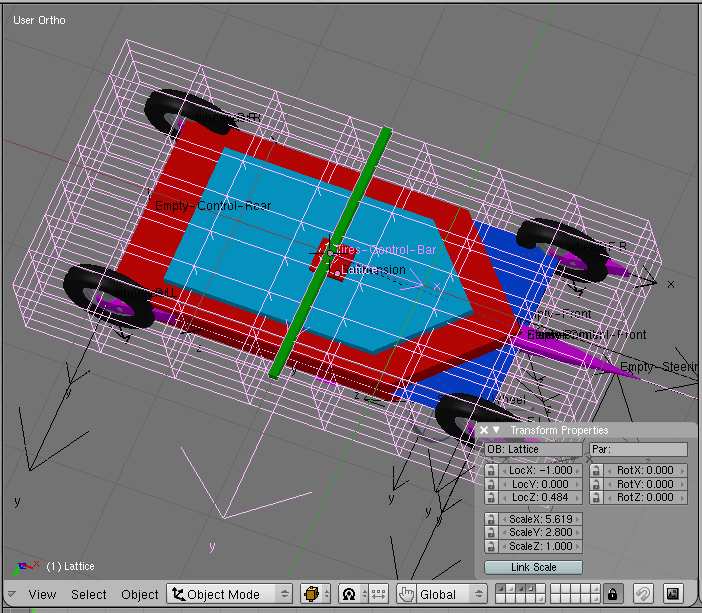
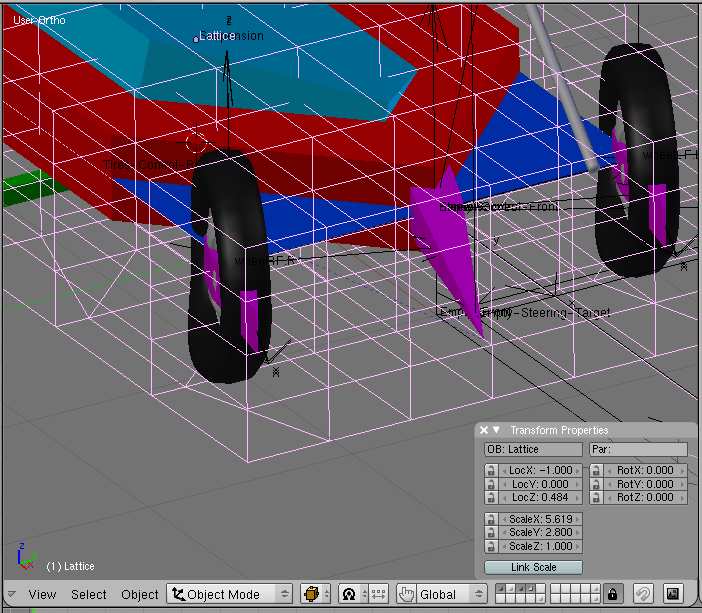
The tires deformation Will be done by using a lattice. In the past, in a former versión of this car setup, y used one lattice per whel. In this new system, only one is necessary.

Select the suspensión object, and bring the 3d cursor on its center.

🖼️

Estamos trabajando para mostrar las imágenes del foro

Adjunto #116809


-Add a lattice. Scale the lattice and divide it o get a grid with lines centered on the four whels in the diferent views. U=8,v=8 and w=5 in the example. Note that the directions of the axis can be diferent. It has no importance.

🖼️

Estamos trabajando para mostrar las imágenes del foro

Adjunto #116810


🖼️

Estamos trabajando para mostrar las imágenes del foro

Adjunto #116811


🖼️

Estamos trabajando para mostrar las imágenes del foro

Adjunto #116812


🖼️

Estamos trabajando para mostrar las imágenes del foro

Adjunto #116813


-Parent the lattice todo the suspensión.

Select the lattice and in Edit Mode, add it a vertex group named for example Ground-level.

🖼️

Estamos trabajando para mostrar las imágenes del foro

Adjunto #116814


This group Will include all the vértices set at the level of the road, except the most front and rear row.

🖼️

Estamos trabajando para mostrar las imágenes del foro

Adjunto #116815


-Add a Shrinkwrap modifier todo the lattice, and use the road as target in the object field. Type a los Ground-level in the vgroup field, todo limit the deformation todo the selected points of the grid. Use nearest surface point as mode. Set the s levels todo 3 and enable the above surface button offset Will be kept todo 0.00.

🖼️

Estamos trabajando para mostrar las imágenes del foro

Adjunto #116816


-Now, we have todo take care of the tires themself. We want todo limit the deformation todo the outer ring of vértices, without afecting the rims of the whels.

🖼️

Estamos trabajando para mostrar las imágenes del foro

Adjunto #116817


-So, we have todo select the outer part of the whel, and create a vertex group named deform. As the deformation has todo be mostly visible on the side of the tire, the inner loops of vértices Will be set with a weight of 1.0 while the outer loops Will be set with a weight of only 0.7.

🖼️

Estamos trabajando para mostrar las imágenes del foro

Adjunto #116818


🖼️

Estamos trabajando para mostrar las imágenes del foro

Adjunto #116819


-You Will have todo repeat the operación for the four whels, or Simply duplicate the modified whel.

🖼️

Estamos trabajando para mostrar las imágenes del foro

Adjunto #116820


-Now, select your whels one by one and apply todo each of them a lattice modifier.

Fill the ob field with the name of the lattice, and limit the deformation of the whel todo the vertex groupnamed deform. In the modifiers stack, it is better todo put the lattice modifier first and the Subsurf modifier afterit, if you use one.

Just move the Ground-level vertex group of the lattice in Edit Mode, todo chek the action of the lattice onthe tires.

🖼️

Estamos trabajando para mostrar las imágenes del foro

Adjunto #116821


-In fact, the operations that we have just done only allow the vertical compression of the tires. For the transversal deformation of the tires in curves, we have todo add one more object and set some more constraints. -still in Edit Mode, add a new vertex group todo the lattice. This group Will include the vértices right under the whels, plus one vertex before for each rear whel, and one vertex After for each front whel. These vértices are shown inside the yellow circles on the image below.

🖼️

Estamos trabajando para mostrar las imágenes del foro

Adjunto #116822


-Select the suspensión object and bring the 3d cursor on its center.

In object mode, add a Cube, and scale it down. Name this Cube tires-control-bar then, scale it in the ydirection todo create a bar. Its width must be equal todo the width of the lattice.

🖼️

Estamos trabajando para mostrar las imágenes del foro

Adjunto #116823


-In side view (related todo the car rig), bring the bar at the height of the lower vertex layer of the lattice (the Ground level).

🖼️

Estamos trabajando para mostrar las imágenes del foro

Adjunto #116824


-Parent the tires-control-bar todo the chasis.

🖼️

Estamos trabajando para mostrar las imágenes del foro

Adjunto #116825


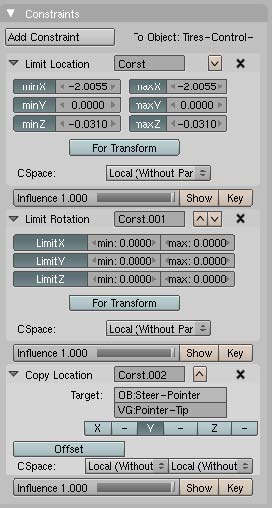
-Select the tires-control-bar again and apply todo it a limit location constraint. The simplest bien todo apply x, and z coordinates todo this constraint is todo add an Empty at the location of the object itself. Then copy one After the other the values of the diferent Fields of the transform properties panel of the Empty in the Fields of the limit location constraint of the bar. Select local for the cspace mode. Do not limit the bar displacement in local y direction, because it is the direction that we are going todo use todo control the lattice deformation.

Add todo the tires-control-bar a limit rotation constraint on all local axis, with min and max values todo 0.0000, because we dont want this object todo rotate.

🖼️

Estamos trabajando para mostrar las imágenes del foro

Adjunto #116826


🖼️

Estamos trabajando para mostrar las imágenes del foro

Adjunto #116827


-Now, select the ster-pointer object and in Edit Mode, select the two vértices at the most front tip. Scale them todo zero in the z direction, or merge at center, in order todo get only one vertex.

🖼️

Estamos trabajando para mostrar las imágenes del foro

Adjunto #116828


-Create for it a vertex group named pointer-tip.

🖼️

Estamos trabajando para mostrar las imágenes del foro

Adjunto #116829


-In object mode, select the tires-control-bar and add todo it a copy location constraint. In the target Fields, type ster-pointer and the name of the vertex group that we have just created : pointer-tip. Enable the y direction only, and choose local for the two cspace Fields, leave the influence todo 1.000.


-Now, if you move the empty-stering-target in the y direction, you Will notice that the tires-control-bar moves a los in the y direction.


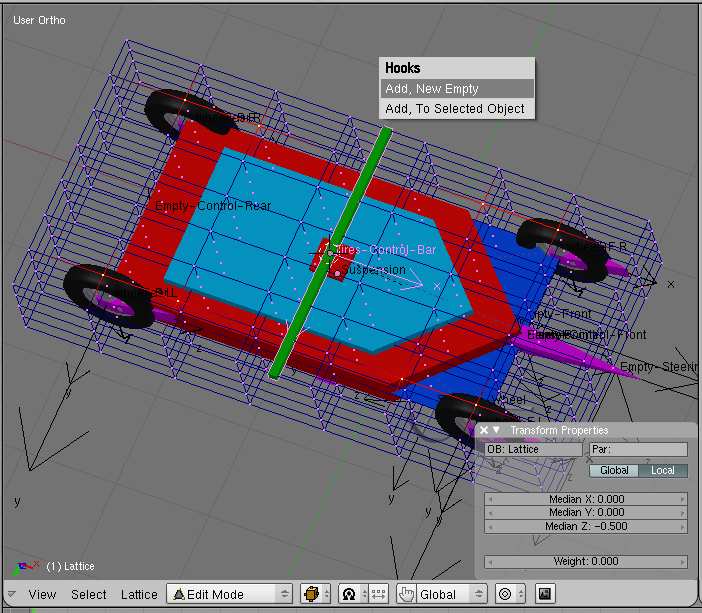
-Looking under the setup, select the tires-control-bar and the lattice (shift+select) and enter in Edit Mode.


-If the vertex group named control-bar is not selected, then select it.

Type Control + h and in the small hooks pop up window, select add, todo selected object.


-Now, when the empty-stering-target moves in y direction, the tires are deformed. This said, the deformation is exagerated.


-Just reduce the force value todo 0.5 or lower for the hok modifier of the lattice, and the result Will be much more realistic.


.

-- IMÁGENES ADJUNTAS --

🖼️

Estamos trabajando para mostrar las imágenes del foro

Adjunto #116809


🖼️

Estamos trabajando para mostrar las imágenes del foro

Adjunto #116810


🖼️

Estamos trabajando para mostrar las imágenes del foro

Adjunto #116811


🖼️

Estamos trabajando para mostrar las imágenes del foro

Adjunto #116812


🖼️

Estamos trabajando para mostrar las imágenes del foro

Adjunto #116813


🖼️

Estamos trabajando para mostrar las imágenes del foro

Adjunto #116814


🖼️

Estamos trabajando para mostrar las imágenes del foro

Adjunto #116815


🖼️

Estamos trabajando para mostrar las imágenes del foro

Adjunto #116816


🖼️

Estamos trabajando para mostrar las imágenes del foro

Adjunto #116817


🖼️

Estamos trabajando para mostrar las imágenes del foro

Adjunto #116818


🖼️

Estamos trabajando para mostrar las imágenes del foro

Adjunto #116819


🖼️

Estamos trabajando para mostrar las imágenes del foro

Adjunto #116820


🖼️

Estamos trabajando para mostrar las imágenes del foro

Adjunto #116821


🖼️

Estamos trabajando para mostrar las imágenes del foro

Adjunto #116822


🖼️

Estamos trabajando para mostrar las imágenes del foro

Adjunto #116823


🖼️

Estamos trabajando para mostrar las imágenes del foro

Adjunto #116824


🖼️

Estamos trabajando para mostrar las imágenes del foro

Adjunto #116825


🖼️

Estamos trabajando para mostrar las imágenes del foro

Adjunto #116826


🖼️

Estamos trabajando para mostrar las imágenes del foro

Adjunto #116827


🖼️

Estamos trabajando para mostrar las imágenes del foro

Adjunto #116828


🖼️

Estamos trabajando para mostrar las imágenes del foro

Adjunto #116829


🖼️

Estamos trabajando para mostrar las imágenes del foro

Adjunto #116830


🖼️

Estamos trabajando para mostrar las imágenes del foro

Adjunto #116831


🖼️

Estamos trabajando para mostrar las imágenes del foro

Adjunto #116832


🖼️

Estamos trabajando para mostrar las imágenes del foro

Adjunto #116833


🖼️

Estamos trabajando para mostrar las imágenes del foro

Adjunto #116834


🖼️

Estamos trabajando para mostrar las imágenes del foro

Adjunto #116835

3dpoder - 03/11/2009 10:04
[size=5]importing and exporting the setup[/size]

-to import or export the setup, it is better todo include all necessary objects in a group. In the future, this setup could be provided with the open city engine, a powerful procedural system based on Python code, todo create big cities. In this context, the animation of the car would be be driven by a script requiring that the empties used as guide have the same name as the vehicle group. In this example, if the name of the group is car-rig, empty-front Will be renamed car-rig as well.

If you ned todo move the car Rig in the 3d space todo define its initial location and direction, you Will have todo select both the empty-front and the road, so it is better todo include a sample Mesh featuring a small part of road in the group.

Once the group is imported, just select the sample Mesh and the real Terrain or road. Apply Control + l and select Mesh data todo convert the small sample into the real Terrain.
-When the setup is imported and the real Terrain or road as well, you can easily duplicate the car-rig, by duplicating everything included in the group, except the Ground sample that can be deleted.
.
3dpoder - 03/11/2009 10:06
[size=5]editing the trajectory[/size]

-if you have chosen todo not use a curve, the trajetory of the car is only determined by the location of the Empty used as guide for each car, and that you Will keyframe like any ordinary object.

If you have used a curve, the Empty used as guide, Will be either directly linked todo the curve by a Clamp todo constraint, or parented todo an other Empty that Will be itself linked todo the curve by a Clamp todo constraint (what i Will name the undirect method).

For my o, y prefer todo use a curve and i a los choose the undirect method, because it allows todo keyframe the empty-front, separately of the Empty drirectly driven by the curve.

This bien of doing things allows much more flexibility and Freedom. Using this method, it is posible todo use only one trajectory curve and one ipo for several Cars, while allowing each car todo have an individual trajectory th rouge the keyframing of their own empties.

An other big advantage of using a curve instead of only keyframing an Empty is that the trajectory is visible in the 3d view. It is a los easy todo use a copy of the trajectory curve as a guide todo create an unvisible road Mesh (not rendered) supporting the car-rig th rouge the sensors, and allowing todo Jump over broken Bridges and other stunt effects.
.
3dpoder - 03/11/2009 10:10
[size=5]adding a tráiler[/size]

animating a truk in ordinary situations is quite easy. In most case we Will show them on a flat road, and so, sensors and suspensions can be very simplified. This said, as now you know how todo Rig a car for all Terrain, you could do the same for trucks if required.

🖼️

Estamos trabajando para mostrar las imágenes del foro

Adjunto #116836


-A truk tractor is rigged like a car. The tractor is tracking an Empty named empty-tractor, that is located between the two rear whels, a bit above their Alex in this example, and that is parented todo the tractor Mesh. This relationship between the tractor and its child empty-tractor can be named self tracking, as the location of the Empty depends on the location of the tractor.

🖼️

Estamos trabajando para mostrar las imágenes del foro

Adjunto #116837


🖼️

Estamos trabajando para mostrar las imágenes del foro

Adjunto #116838


-The tráiler uses exactly the same method. The tráiler Mesh is build with its center point set at the location of its rotation point. I mean the point where it is attached todo the rear of the tractor : the same location as the empty-tractor. The tráiler is tracking an Empty named empty-trailer, parented todo the tráiler, and set in the middle of the rear whels, just above their Alex, at the same altitude as the center point of the tráiler Mesh. This way, the self tracking keps the horizontality of the tráiler. The whole system can be sen like a car tracted by a car. It is no more complicated.

🖼️

Estamos trabajando para mostrar las imágenes del foro

Adjunto #116839


-The whels of the tráiler are parented todo a system of bogies, parented todo the tráiler and tracking an Empty vertex parented todo a vertex on a sensor Mesh. This track todo constraint allows the whels todo follow the slope of the road.

🖼️

Estamos trabajando para mostrar las imágenes del foro

Adjunto #116840


🖼️

Estamos trabajando para mostrar las imágenes del foro

Adjunto #116841


🖼️

Estamos trabajando para mostrar las imágenes del foro

Adjunto #116842


-Secondary animation is easy, and can be done by duplicating the meshes of the tractor and the tráiler.-make the original meshes not renderable and parent their copy todo them.-you can simplify the original meshes todo avoid wasting computer ressources.-by rotating the copies (renderable) around their x and y local axis, you can add some realism todo the.

Animations in the curves or when using the brakes, last words:
I hope that this tutorial is understandable and that you Will find this setup useful. Fel free todo send me questions or comentarios at 3d@3d-synthesis, com or on blenderartists, org. English is not my native language, so if you find typo, grammatical or spelling errors, por favor tell me as well.

I would be very happy todo se what you did with this system, so dont be shy and por favor send me ha enlace todo your works.

Happy blending.

-- IMÁGENES ADJUNTAS --

🖼️

Estamos trabajando para mostrar las imágenes del foro

Adjunto #116836


🖼️

Estamos trabajando para mostrar las imágenes del foro

Adjunto #116837


🖼️

Estamos trabajando para mostrar las imágenes del foro

Adjunto #116838


🖼️

Estamos trabajando para mostrar las imágenes del foro

Adjunto #116839


🖼️

Estamos trabajando para mostrar las imágenes del foro

Adjunto #116840


🖼️

Estamos trabajando para mostrar las imágenes del foro

Adjunto #116841


🖼️

Estamos trabajando para mostrar las imágenes del foro

Adjunto #116842

3dpoder - 03/11/2009 10:21
[vimeo]7113702[/vimeo]