Los
Mesh deform son muchísimo más potentes.
Mesh deform modifier
The meshdeform modifier can deform a Mesh with another cage Mesh. It is similar to a lattice modifier, but instead of being restricted to the regular grid layout of a lattice, the cage Mesh can be modeled to fit the Mesh better.

Chinchilla deformed with the Mesh deform modifier, model and Rig by the peach team.
usage
The cage Mesh is a regular Mesh object, but it must form a closed cage around the part of the Mesh to be deformed. Only vértices Within this cage Will be deformed. Typically the cage Mesh Will have far fewer vértices than the target Mesh. The distance of the cage vértices to the target Mesh is useful to tweak the influence. Offsetting the cage far Will give Smooth but less local influence on the Mesh below, while setting the cage closer Will give more local control but less smoothing out of the influence.
After modeling the cage Mesh, add a meshdeform modifier, fill in the cage Mesh object name, and press the bind button. This Will compute the binding weights, which can take a while, from a few seconds to a few minutes, depending on the specified precisión. Setting the precisión higher increases the accuracy, but can a los make the binding process considerably slower.
Binding at high precisión can take up a lot of memory and take a long time. Unfortunately even at high levels the results can still be inaccurate if the cage Mesh is close to the deforming Mesh, which is quite visible when the cage is rotated by a large amount, like 180 Degrees. A work-around is to first rotate a parent object of both the cage and deformed Mesh to roughly the right position, and then do the finer transformations with Mesh deform. In the future we hope to improve both the accuracy and performance of the Mesh deform modifier.
Note: Mesh deform does not work for multi-res.

Effect of cage Mesh offset: larger cage on the left gives rounder deformation than smaller cage on the right.
interior control
Besides the cage, more Faces Within the cage, lose or forming another smaller cage, be used for extra control. Such smaller cages may a los overlap with the main cage, for example to get extra control over the eyes, two small sphere cages could be added around them.
dynamic binding
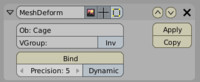
By enabling the dynamic option, the Mesh can still move Within the cage Mesh and deform correctly. If it goes outside of the cage Mesh the results are undefined. This option is disabled by default because it is slower and uses more memory. An example escenario where this would be useful is to do the main deformation with the Mesh deform modifier, and use shape keys for facial expressions.
implementation
The implementation is based on this paper:
Harmonic coordinates for character articulation
Pushkar joshi, marque Meyer, Tony derose, Brian green and Tom sanocki, sigraph 2007.
example
chinchilla demo file..
-- IMÁGENES ADJUNTAS --
🖼️
Estamos trabajando para mostrar las imágenes del foro
Adjunto #82320
🖼️
Estamos trabajando para mostrar las imágenes del foro
Adjunto #82321
🖼️
Estamos trabajando para mostrar las imágenes del foro
Adjunto #82322


