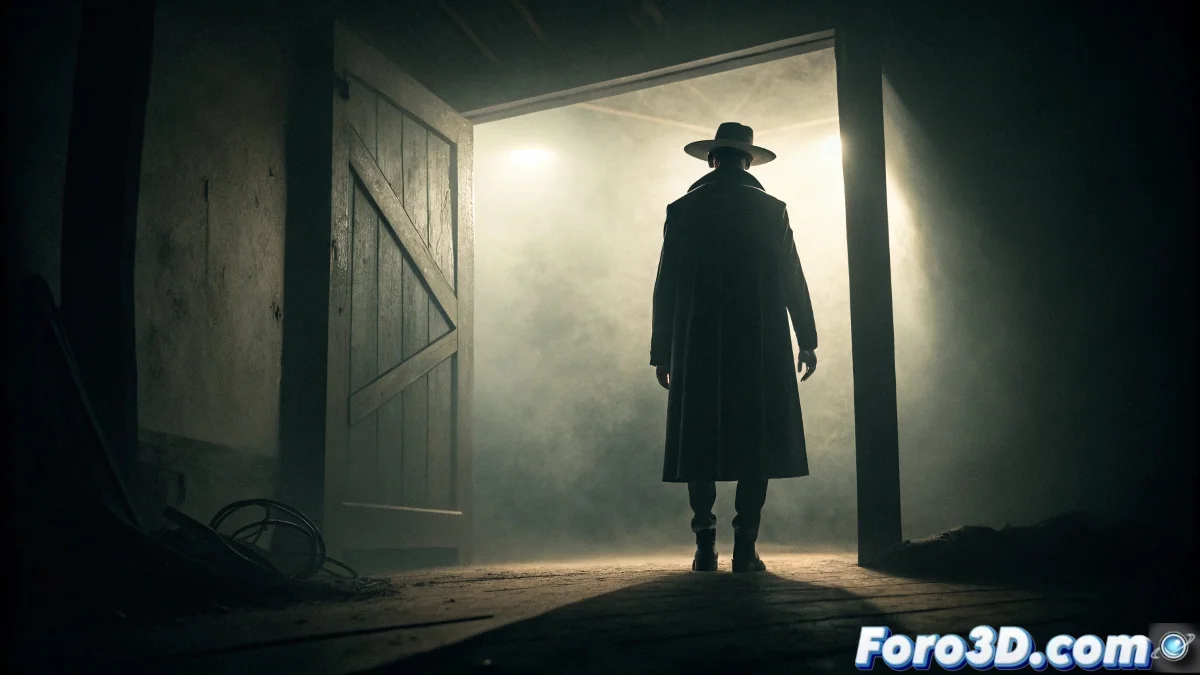
Tracking and Stabilization of the Hat Man in Mocha Pro for Psychological Horror
The figure of the Hat Man represents one of the most universal phenomena of modern horror, a entity associated with sleep paralysis that appears as a tall, shadowy silhouette with a wide-brimmed hat, remaining motionless in thresholds and generating terror through its passive presence and absolute anonymity, offering the perfect case for mastering advanced planar tracking and stabilization techniques in Mocha Pro. 🎩
Phenomenological Context and Psychological Horror
This archetype of dream terror transcends cultures and geographies, appearing in sleep paralysis reports worldwide. Its power lies precisely in what it does not do: it does not move, does not emit sounds, does not attack physically. The threat is purely psychological, emerging from the combination of the victim's forced immobility and the impassive presence of this figure watching from the darkness.
Universal characteristics of the phenomenon:- Tall, thin human silhouette with a wide-brimmed hat
- Face hidden in shadows or completely absent
- Static position in thresholds or dark corners
- Appearance during sleep paralysis states
- Sensation of intense and malevolent observation
Its passive presence and total anonymity are what induce the deepest terror - Analysis of the psychological phenomenon
Camera Movement and Perspective Research
It is essential to analyze the typical behavior of cameras in horror scenes, study angles that generate claustrophobia, understand the psychology of composition in confined spaces, and develop techniques to integrate static elements into scenes with subtle but significant camera movement.
Essential research areas:- Characteristic camera movements in psychological horror cinema
- Angulations that generate a sense of vulnerability
- Composition techniques to emphasize silent presence
- Psychology of perception in low-light conditions
- Visual power dynamics between static figure and viewer
Step by Step: Tracking in Mocha Pro
1. Initial Project Setup
Open Mocha Pro 2023 and import the sleep paralysis scene footage. Set the frame rate to match the original material. Establish the appropriate color space and enable high-precision mode for critical tracking.
2. Tracking Plane Selection
Identify optimal flat surfaces: - Look for walls, door frames, or textured surfaces - Avoid areas with excessive motion blur or changing lighting - Select multiple planes for redundant tracking - Mark areas with the best contrast and visible texture
3. Creation of Tracking Layers
Organize tracking by components: - Layer 1: Main door frame or threshold - Layer 2: Adjacent wall with visible texture - Layer 3: Floor or lower surface as reference - Layer 4: Additional architectural elements
4. Tracking Parameter Adjustment
Configure for maximum precision: - Adjust motion sensitivity according to camera movement - Set min % pixels to avoid jumps - Establish track range for the entire sequence - Enable subpixel precision for extra smoothing
5. Manual Correction and Refinement
Perfect the automatic tracking: - Review frame by frame in problematic areas - Manually adjust tracking points where necessary - Use fine-tuning tools for subtle corrections - Apply surface smoothing to eliminate vibration
6. Tracking Data Export
Generate compositing information: - Export corner pin data for external applications - Generate transform data for position, rotation, and scale - Create stabilized footage for additional work - Export shape data for masks and rotoscoping
7. Hat Man Integration
Apply the tracking to the spectral element: - Import the Hat Man render - Apply corner pin for precise placement - Adjust perspective to match camera angle - Refine blend modes for natural integration
8. Spectral Presence Effects
Develop supernatural properties: - Apply slight floating with time expressions - Create subtly animated opacity variations - Develop heat distortion for hot air effect - Apply color grading for environmental matching
9. Stabilization and Final Adjustment
Perfect the visual integration: - Use stabilize module for handheld shots - Apply remove jitter for camera vibration - Refine motion blur to match footage - Adjust grain and noise matching
10. Render and Delivery
Prepare for post-production pipeline: - Render with appropriate codec for the project - Generate versions with and without the element for flexibility - Create matte passes for additional control - Include tracking metadata for reference
Advanced Planar Tracking Techniques
For professional results, master the use of 3D camera solver for complex shots, utilize power mesh for deformable surfaces, and develop insert tracking techniques for perfect integration into irregular surfaces. 🎬
Recommended advanced techniques:- 3D camera solver for complex movement
- Power mesh for deformable surfaces
- Insert tracking for moving objects
- Magnet tools for quick corrections
Integration with Compositing Software
When exporting to After Effects or Nuke, configure the tracking data to maintain maximum precision, develop expressions to automate adjustments based on camera movement, and create reusable templates for future psychological horror projects.
Tracking the Absent Presence
Working with the Hat Man in Mocha Pro explores the paradox of stabilizing the intangible, demonstrating that the most effective terror often resides in elements that defy conventional tracking, requiring advanced techniques to perfectly integrate figures that, by design, should be impossible to capture or quantify. 🌑