A Workshop to Improve Layer Workflow
At the Blender 2024 conference, an intensive workshop was held to discuss how actions should be implemented in layers within Blender. This workshop brought together several animation and rigging experts to focus on making the tool more functional and efficient for animators.
Workshop Objectives
The workshop was divided into two parts. In the first, use cases and workflows that should be addressed in the initial version of actions in layers were established. The goal was to create a minimum viable product (MVP) that would be useful without getting into complexities.
Use Cases and Workflow
- Create new animations from scratch: Use layers to animate the base movement and add details like shakes.
- Adjust existing animations: Modify previous animations without destroying the original data.
- Organize animation data: Place facial animations in one layer and body animations in another.
- Incorporate non-keyframe data: Work with simulation data or movements stored in cache.
Initial Layer Features
The minimum necessary features for the layer system were defined:
- Name layers
- Reorder and duplicate layers
- Lock or disable layers
- Mix layers using "replace" or "combine" modes.
Layer Management and Interface
It was discussed how to handle layers within a separate editor in Blender, facilitating the selection of the active layer. Initially, the interface will be simple, but it can be improved over time, ensuring that animators have quick and easy access to the new tools.
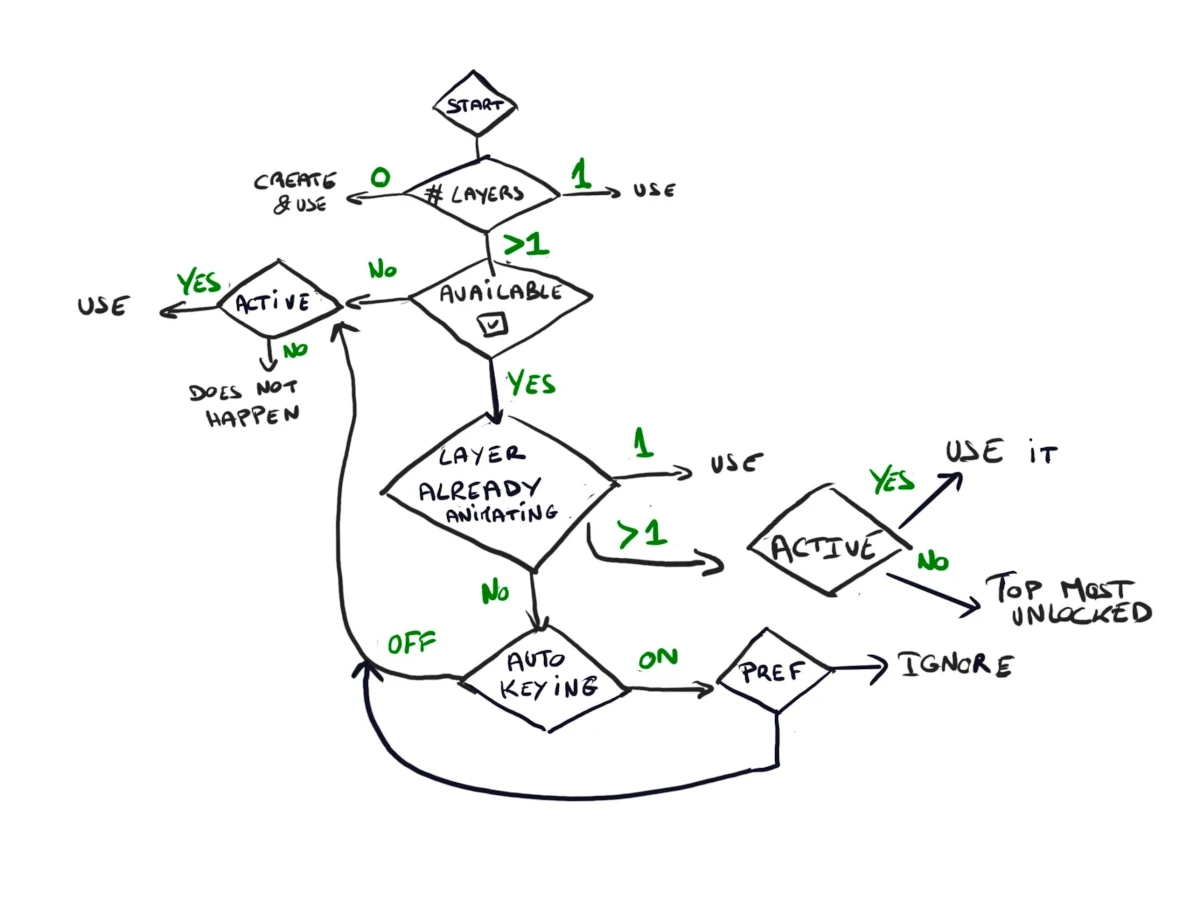
Animation Keys Workflow
A clear system was defined for the placement of animation keys in layers, taking into account whether there is an active layer or whether keys should be assigned to the corresponding layer based on the context.
The goal is to create a simple yet powerful tool that allows animators to manage their animations efficiently, without having to wait for complex features.