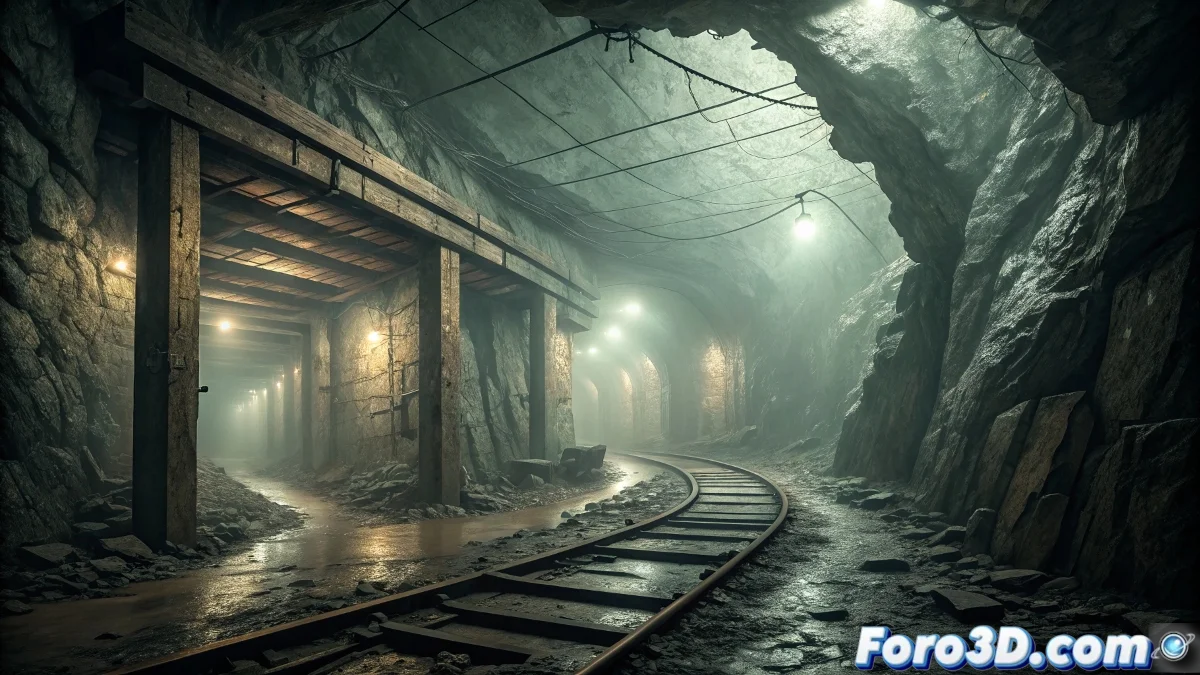
Texturing the Death Shaft of the Harz Mine in Foundry Mari
The Death Shaft of the Harz Mine in Germany represents one of the most unsettling mining mysteries of the 19th century, where a mine shaft sealed after a collapse continued emitting screams that seemed to imitate human terror for weeks, suggesting the presence of a subterranean entity that fed on panic, offering the perfect scenario to master advanced texturing techniques for abandoned industrial environments in Foundry Mari. ⚒️
Historical Context and Industrial Terror
This abandoned mine in the Harz region encapsulates the unique terror of early industrialization, where resource exploitation met phenomena that defied the scientific understanding of the time. The combination of industrial disaster, mining superstition, and inexplicable acoustic phenomena creates a narrative where the natural and the supernatural intertwine in the earth's depths.
Characteristic elements of the scenario:- 19th-century mining architecture in a state of collapse
- Corroded and degraded industrial materials
- Moisture and deep seepage effects
- Signs of abruptly abandoned human activity
- Visual atmosphere of oppression and confinement
The air became heavy and foul and screams arose that seemed to imitate human terror - Historical reports from the mine
Research on Historical Materials and Deterioration
It is essential to study 19th-century mining construction materials, corrosion patterns in subterranean environments, the effects of constant moisture on different surfaces, and develop techniques to visually represent the "heaviness" of the air and degradation from prolonged abandonment.
Essential research areas:- German 19th-century mining construction materials
- Corrosion and oxidation patterns in humid environments
- Fungus formation and biological growth in mines
- Structural collapse effects on different materials
- Techniques to visually represent atmospheric density
Step by Step: Texturing in Foundry Mari
1. Initial Project Setup
Open Foundry Mari 7 and import the 3D model of the mine shaft. Set up the project with UDIM tiles for high resolution. Set color management to ACEScg for extended dynamic range in low-light conditions.
2. Base of Historical Materials
Establish the fundamental layers: - Create natural stone base with procedurals - Develop aged support wood layer - Implement corroded metallic materials - Add base of earth and accumulated sediments
3. Deterioration and Abandonment Layers
Develop signs of degradation: - Use grunge maps for rust and advanced corrosion - Apply procedurals for cracking and fractures - Create dust and sedimentation layers by gravity - Develop moisture and seepage effects
4. Structural Collapse Effects
Simulate the mining disaster: - Create deformation areas with displacement maps - Develop splintered and broken wood textures - Implement metallic torsion effects - Add debris and collapse layers
5. Biological and Organic Elements
Incorporate life in decay: - Develop fungus and mold textures - Create lichen and biological growth layers - Implement invasive root effects - Add cobweb and abandoned nest materials
6. "Heavy and Foul" Air Effects
Visually represent the oppressive atmosphere: - Create atmospheric density layers with opacity - Develop vapor and emanation effects - Implement color grading for stale air - Add suspended particles with procedurals
7. Signs of Paranormal Activity
Incorporate subtle supernatural elements: - Create thermal distortion areas with noise patterns - Develop residual energy effects with emission maps - Implement "scream" marks with subtle displacement - Add anomalous cold zones with color temperature variation
8. Integration of Narrative Elements
Add story through textures: - Create marks of abandoned tools - Develop oxidized mining equipment textures - Implement deteriorated documents and maps - Add personal miners' elements
9. Final Adjustments and Visual Cohesion
Unify the complete palette: - Balance saturation for a gloomy atmosphere - Adjust contrast for dramatic depth - Develop global color grading for coherence - Create variation system for different areas
10. Export and Optimization
Prepare for final render: - Export organized texture sets by material - Generate UDIM tiles for maximum resolution - Create optimized versions for different LODs - Prepare documentation for shading team
Advanced Procedural Texturing Techniques
For cinematic results, master the use of complex noise patterns, develop custom procedurals for unique effects, and use hand-painting techniques for specific narrative details. 🎨
Recommended advanced techniques:- Complex noise patterns for natural variation
- Custom procedurals for unique effects
- Hand-painting for narrative details
- Advanced masking techniques for precise control
Integration with Render Engines
When exporting to Unreal Engine 5 or Arnold, configure PBR materials to exploit global illumination systems, develop shaders that respond to dynamic atmospheric conditions, and create decal systems for additional narrative details.
Texturing Underground Terror
Working with the Harz Death Shaft in Foundry Mari explores the intersection between industrial history and psychological horror, demonstrating that textures can communicate not only materiality but also emotional narrative, where each layer of rust, each crack, and each moisture stain tells a story of accumulated terror through decades of abandonment and inexplicable phenomena. 🕳️