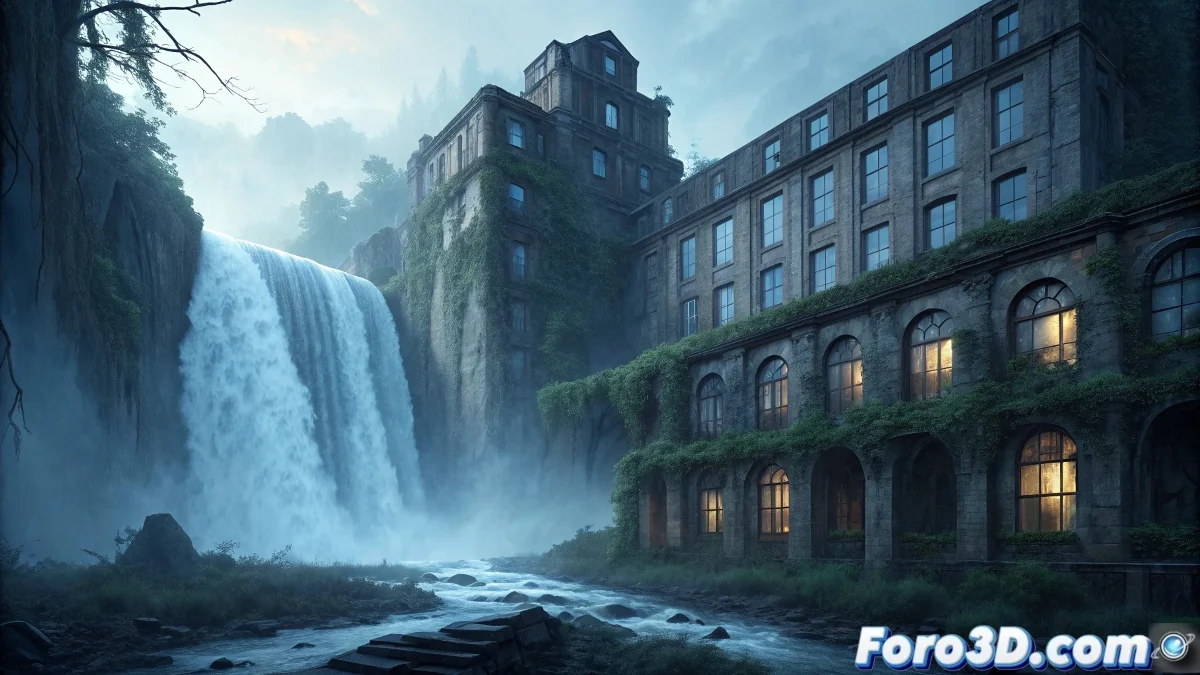
Texturing the Hotel del Salto del Tequendama in Substance Painter
The Hotel del Salto del Tequendama in Colombia represents an architectural jewel with a tragic past, where a luxurious 1928 hotel became the scene of numerous suicides and currently stands as an abandoned structure haunted by the spirits of its victims, offering the perfect case to master abandonment and deterioration texturing techniques in Substance Painter. 🏨
Historical Context and Emotional Weight
This Colombian architectural icon located next to the majestic Tequendama waterfall was inaugurated during the country's golden era, but its fame darkened when it became a preferred suicide spot, leading to its closure and subsequent abandonment. The combination of spectacular natural beauty and human tragedy creates a unique atmosphere of melancholy and paranormal presences.
Key Scenario Elements:- French stately architecture from the 1920s
- Dramatic location next to a 157-meter waterfall
- Documented history of multiple suicides
- Progressive abandonment since the mid-20th century
- Constant reports of paranormal activity
A place that evokes a deep sense of sadness and desolation - Description of the hotel's atmosphere
Visual Research and Documentation
It is essential to gather historical and current photographic material of the hotel, study the original construction materials, and analyze the specific deterioration patterns of Colombian architecture from that era to achieve authentic texturing.
Essential Reference Sources:- Historical photographs of the hotel during its operational era
- Current images of the abandonment state
- Documentation of 1920s construction materials
- Study of moisture and deterioration patterns in mountainous climate
Step by Step: Texturing in Substance Painter
1. Initial Project Setup
Open Substance Painter 2023 and import the 3D model of the hotel. Set up the project with the PBR - Metallic Roughness template. Set the texture resolution to 4K or higher to capture fine deterioration details. Configure appropriate UV padding to avoid bleeding.
2. Base Historical Materials
Create the base layers corresponding to the original materials: - Plaster and stucco for exterior walls with historical color - Noble wood for window and door frames - Carved stone for decorative elements and foundations - Forged metal for railings and ornamental details - Fired clay tiles for characteristic roofs
3. Aging and Deterioration Layers
Implement progressive deterioration effects: - Use generators with grunge maps for accumulated dirt - Apply height information for erosion and surface wear - Create dust and sedimentation layers on horizontal surfaces - Develop cracking effects on paint and plaster
4. Moisture and Leakage Effects
Simulate the characteristic water damage: - Create water stains with directional gradients - Implement mold and mildew in poorly ventilated areas - Develop efflorescence effects on masonry walls - Apply corrosion on exposed metal elements
5. Invasive Vegetation and Nature
Texture the organic growth: - Use alpha brushes for moss in shaded areas - Create ivy and vine layers with displacement - Implement root effects that break structures - Apply leaf sedimentation and organic matter
6. Structural Damage and Abandonment
Develop signs of advanced deterioration: - Create cracks and fractures with curvature generators - Implement missing pieces and partial collapses - Develop rust and advanced corrosion effects - Apply discoloration from prolonged sun exposure
7. Paranormal and Atmospheric Effects
Incorporate subtle supernatural elements: - Create faint glowing effects in reported activity areas - Implement subtle distortion effects to suggest presences - Develop cold spots with color temperature variations - Apply ethereal fingerprints and ghostly marks
8. Narrative Details and Storytelling
Add elements that tell the story: - Create graffiti and time-stamped vandalism marks - Implement effects of abandoned and deteriorated furniture - Develop traces of past human occupation - Apply personal objects left behind
9. Final Adjustments and Atmospherics
Perfect the overall atmosphere: - Balance color saturation for appropriate melancholy - Adjust contrast and brightness for drama - Implement overall dust and atmospheric perspective - Create light leaks and dim lighting effects
10. Export and Optimization
Prepare the textures for game engine: - Set up export templates for your target engine - Generate necessary maps (Albedo, Normal, Roughness, etc.) - Optimize resolution based on performance needs - Create material instances for variations
Advanced Texturing Techniques
For professional results, master the use of anchor points for complex effects, use particle brushes for organic deterioration, and develop reusable smart materials for consistency in large projects. 🎨
Recommended Advanced Techniques:- Use of anchor points and mask generators
- Particle brushes for natural deterioration effects
- Smart materials for architectural consistency
- Baking of complex meshes for better detail
Integration with Game Engines
When exporting to Unreal Engine or Unity, configure PBR materials correctly, adjust roughness and metallic parameters according to real materials, and use texture streaming to optimize performance without sacrificing visual quality.
Preserving Memory Through Texturing
Texturing the Hotel del Tequendama in Substance Painter is not just a technical exercise, but a way to preserve the historical and emotional memory of a place that encapsulates both architectural grandeur and human tragedy, creating a visual testament to its complex and moving history. 💔