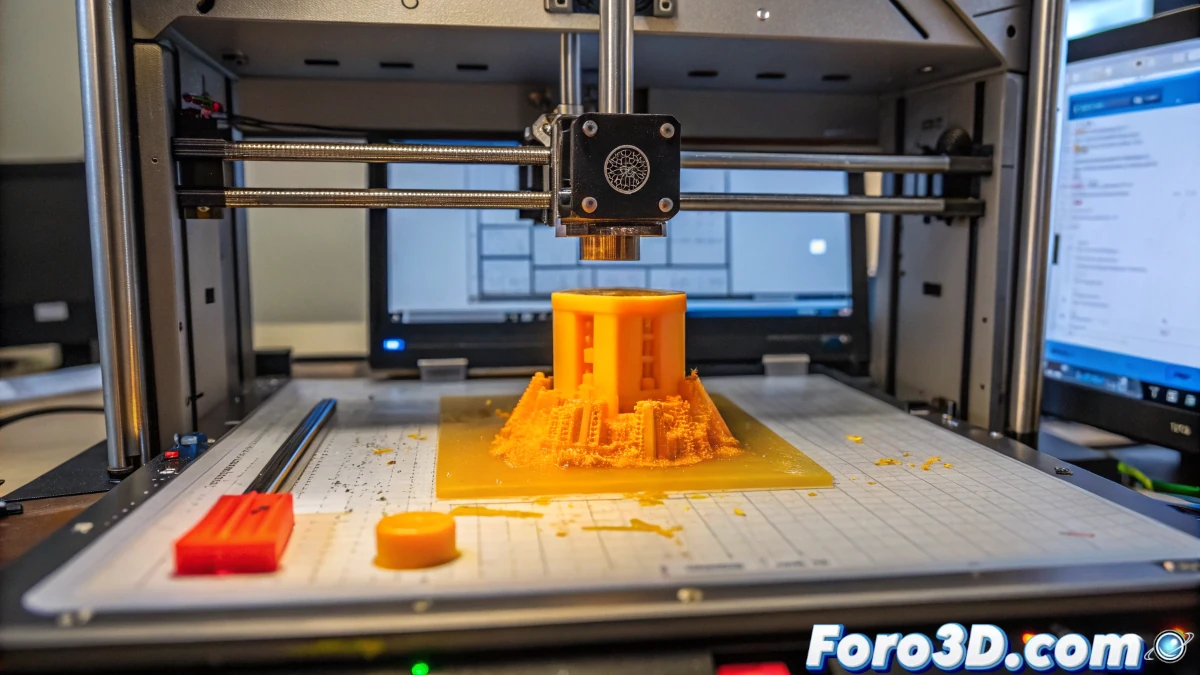
Problem identification
One of the most common challenges for those starting in 3D printing is filament dragging. This problem occurs when, after a few correctly printed layers, the material begins to accumulate on the nozzle, sticks to the hotend, and ruins the print.
In this case, a user with an Ender and PETG filament has experienced this issue, indicating that several causes may be occurring simultaneously.
Possible causes and solutions
Incorrect bed leveling
A nozzle too close to the bed can hinder material extrusion and cause buildups.
- Use a sheet of paper to manually level the bed.
- Move the nozzle to each corner and check that the friction is light and uniform.
- Adjust the screws until achieving even leveling.
Hotend and bed temperature
PETG requires a higher temperature than PLA, but incorrect adjustment can cause problems.
- Increase the hotend temperature in 5°C increments. If working at 230°C, try 235-240°C.
- Adjust the heated bed temperature to about 70°C to improve adhesion.
- Apply Nelly hairspray or specific adhesives to ensure better piece fixation.
Excess material extruded
If the extruder is pushing more filament than necessary, it can accumulate on the nozzle and cause dragging.
- Reduce the filament flow in the slicer to 90-95%.
- Decrease the print speed to 40 mm/s to allow better material deposition.
Partial nozzle clog
If the nozzle clogs intermittently, the filament can stop and cause buildups.
- Check that the nozzle is not partially clogged.
- Perform cleaning with a cleaning filament or cold pull method.
Inadequate cooling
PETG needs less cooling than PLA, but inadequate airflow can affect print quality.
- Check the layer fan and adjust its power.
- On some printers, it may be necessary to reduce fan usage to improve layer adhesion.
Conclusion
Filament dragging in 3D printing can be due to multiple factors, from incorrect leveling to extrusion or temperature issues. The best strategy is to adjust each parameter individually and perform tests until achieving an optimal print.
With these adjustments, it is possible to improve print quality and reduce failures associated with material buildup on the nozzle.