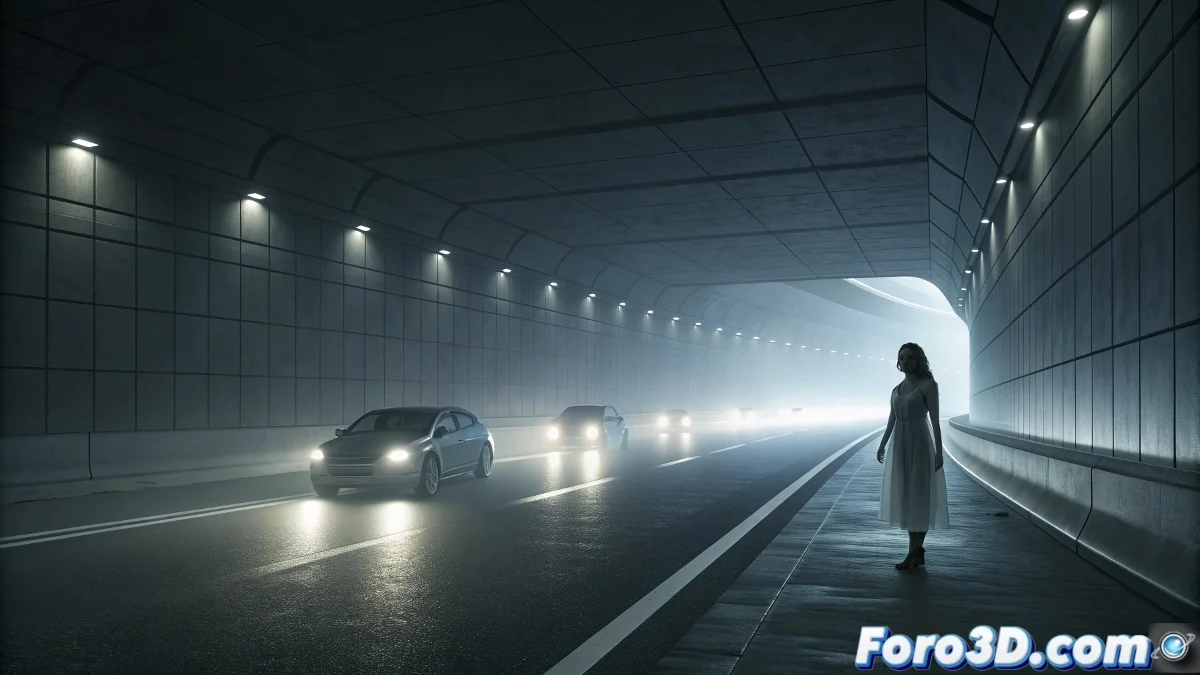
Representing the Ghost Hitchhiker of the Belchen Tunnel with InstaMAT
The Belchen Tunnel in the Swiss Jura Mountains is a modern engineering marvel that hides a terrifying mystery along its 3.2 kilometers. This road tunnel, known for its dangerous conditions and heavy traffic, is the scene of repeated sightings of a "ghost hitchhiker woman" who suddenly appears at the edge of the roadway. Witnesses report that the figure gets into vehicles only to disappear moments later or warn of imminent dangers, creating a surreal confrontation with the paranormal in an ultramodern space. 🚗
The Phenomenon of Precognition in Confined Spaces
What makes this phenomenon particularly unsettling is its completely modern context and the precognitive nature of the appearances. The ghost woman not only appears out of nowhere in a controlled and monitored environment, but several drivers have claimed that her warnings have prevented real accidents. This combination of spectral appearance and protective purpose challenges traditional categories of paranormal phenomena, placing the terror at the intersection between the supernatural and the utilitarian.
Key Elements of the Reported Phenomenon:- Sudden appearance of a young woman in modern clothing at the edge of the tunnel
- Hitchhiker behavior seeking to get into vehicles
- Instant disappearance after entering the car or giving a warning
- Precognitive nature: warns of real imminent dangers
"In the Belchen Tunnel, the supernatural does not dwell in medieval castles but in the intermediate spaces of our modern infrastructure"
Tunnel Environment Setup in InstaMAT
Start by importing your 3D tunnel model or creating a basic one with cylindrical geometry in your modeling software. In InstaMAT, set the real dimensions of the Belchen Tunnel: 3.2 km long, 10 meters high, and two lanes per direction. Prepare the main surfaces for texturing: tunnel walls, roadway, ceilings with lighting, and safety elements like barriers and signs.
Surface Preparation for Texturing:- Tunnel interior walls with concrete surface
- Asphalt roadway with reflective lane markings
- Ceiling with artificial lighting installation
- Safety barriers and ventilation systems
Applying Realistic Materials with InstaMAT
Use InstaMAT's PBR material library to apply realistic textures to each surface. For the tunnel walls, select a concrete material with high roughness and slight reflectivity to simulate vehicle wind-polished concrete. The asphalt roadway requires a material with medium-high roughness and normal maps to simulate pavement texture. Don't forget the lane markings with reflective material to capture their behavior with artificial lighting.
Specific Material Configurations:- Wall concrete: roughness 0.7, reflectivity 0.3, light gray color
- Roadway asphalt: roughness 0.8, black color with slight variations
- Lane markings: low roughness, high reflectivity, intense white color
- Lighting: emissive materials with adjustable intensity
Creating the Spectral Figure Effect
For the ghost hitchhiker, create a transparent flat surface with the human silhouette. In InstaMAT, apply a custom material with high transparency and slight emission in pale bluish tones. Configure the material with subsurface scattering to simulate the ghostly translucency effect. Adjust the roughness to very low and reflectivity to medium to create the characteristic ethereal glow of the reported apparitions.
Parameters for the Ghost Material:- Transparency: 0.8-0.9 for semitransparent effect
- Emission: very faint light blue color (value 0.1-0.3)
- Subsurface scattering: medium radius with bluish color
- Roughness: 0.1 for nearly specular surface
Integration of Atmospheric and Lighting Effects
The tunnel environment requires careful lighting to convey the sense of confinement and the contrast with the apparition. Set up point lights that simulate the tunnel's artificial lighting, creating the characteristic chiaroscuro pattern of long tunnels. Add light fog effects using InstaMAT's volumetric parameters to create that charged atmosphere where the ghost figure can credibly materialize.
Final Environmental Configuration:- Tunnel lights: warm temperature (3500K), medium intensity
- Volumetric fog: low density, neutral color
- Reflections on wet concrete surfaces
- Contrast between well-lit areas and deep shadow zones
Final Composition of the Inexplicable Phenomenon
Position the spectral figure in the tunnel's emergency area, right at the boundary between light and shadow. The composition must suggest sudden movement - as if the figure had appeared instantly. The final render must capture that sense of disbelief experienced by drivers: the brutal confrontation between the rationality of the modern environment and the irruption of the impossible in the form of a presence that defies all logical explanation, but paradoxically can save lives through its supernatural warnings. 👻