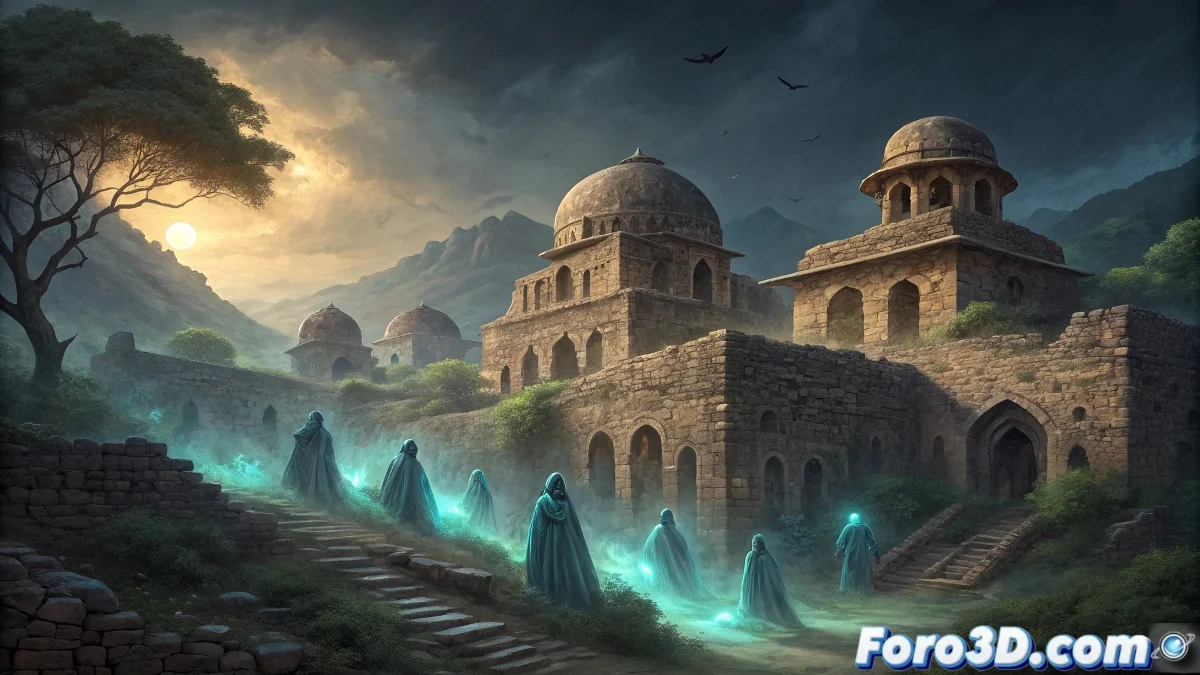
Illustrating the Curse of Bhangarh Fort in Adobe Illustrator
The Bhangarh Fort in Rajasthan, India, holds the haunting honor of being the only site officially "prohibited after sunset" by the Indian government. This 17th-century fortress bears a legendary curse dating back to when a sorcerer named Singhia fell in love with Princess Ratnavati. Upon being rejected, he cast a deadly curse that doomed all inhabitants to death and trapped their spirits without possibility of reincarnation, creating an atmosphere of absolute terror where thousands of souls eternally watch intruders. 🏰
The Curse of the Rejected Sorcerer
The central legend of Bhangarh tells how the sorcerer Singhia tried to bewitch a perfume oil to make the princess fall in love with him. When she discovered the trick, she threw the vial against a rock, which rolled toward the sorcerer and killed him. In his final moments, he cursed the fort and all its inhabitants. The curse was fulfilled when the fort was invaded and destroyed years later, and since then, no one who remains after dusk returns to tell what they experienced, according to local beliefs.
Key historical and legendary elements:- 17th-century Rajasthani architecture in advanced state of ruin
- Temples dedicated to Hanuman and Gopinath within the complex
- Princess Ratnavati's palace with ornate balconies
- Thousands of trapped spirits according to the curse legend
"In Bhangarh, the stones not only tell stories of kings and princesses, but whisper the eternal despair of souls condemned to repeat their agony"
Document Setup and References in Illustrator
Open Adobe Illustrator and create a new document of 3000x4000 pixels with RGB color mode for digital work. Research photographic references of characteristic Rajasthani architecture: ornate arches, domes, jharokhas (balconies), and sandstone details. Set up a color palette with ochre, terracotta, and golden tones for the architecture, contrasting with deep blues for the twilight sky.
Initial project setup:- 3000x4000px document with RGB color mode
- Rajasthani palette: ochre, terracotta, sandstone pink, twilight blue
- Layer organization: sky, mountains, architecture, ghosts, effects
- Enable rulers and guides for precise composition
Creating the Ruined Rajasthani Architecture
Use the Pen tool to trace the characteristic architectural shapes of the fort. Start with the main structures: the royal palace, temples, and entrance gates. Apply complex gradients to simulate the eroded sandstone texture over centuries. Use the Brush tool with custom textures to create deterioration effects, cracks, and collapsed sections. For ornamental details, employ simplified traditional Rajasthani patterns and motifs.
Architectural illustration techniques:- Pen tool for precise structure outlines
- Mesh gradients for realistic volume in domes and arches
- Textured brushes for erosion and abandonment effects
- Symbol tool for repetitive elements like windows
Representing the Trapped Spirits
For the thousands of trapped souls, create semitransparent humanoid silhouettes using the Shape tool with Gaussian blur effects. Develop several ghost templates with different poses and levels of definition. Use blending modes like Overlay and Screen to integrate them naturally into the environment. Distribute them strategically in windows, doors, and dark areas, creating the sensation of being watched from multiple directions.
Techniques for spectral effects:- Basic shapes modified with the Warp tool
- 10-30% transparencies for ghostly effect
- Overlay and Screen blending modes for environmental integration
- Variable Gaussian blur based on distance
Twilight Lighting and Atmospheric Effects
Create a sunset sky using radial gradients ranging from intense orange on the horizon to deep blue at the zenith. For the characteristic elongated shadows of dusk, use black shapes with gradual transparencies. Add light effects in windows and specific areas using transparency gradients in Overlay mode. The lighting should convey that magical and terrifying moment when the fort becomes officially prohibited.
Key lighting elements:- Radial gradient for twilight sky
- Elongated shadows with gradual transparency
- Dim light points in Overlay mode
- Subtle reflections on stone surfaces
Final Composition and Curse Narrative
Organize all elements into a composition that tells the story of the curse. Use perspective lines that lead the eye toward the princess's palace. Create dramatic contrasts between the lit areas by the last sun and the deep shadow zones where the spirits dwell. The final result must convey the oppressive sensation of being watched by thousands of invisible eyes, capturing the essence of terror in Bhangarh: not only the fear of the supernatural, but the metaphysical anguish of souls condemned to an existence without hope of release. 👁️