How to Simulate Maquettes with the Tilt-Shift Effect in Post-Production
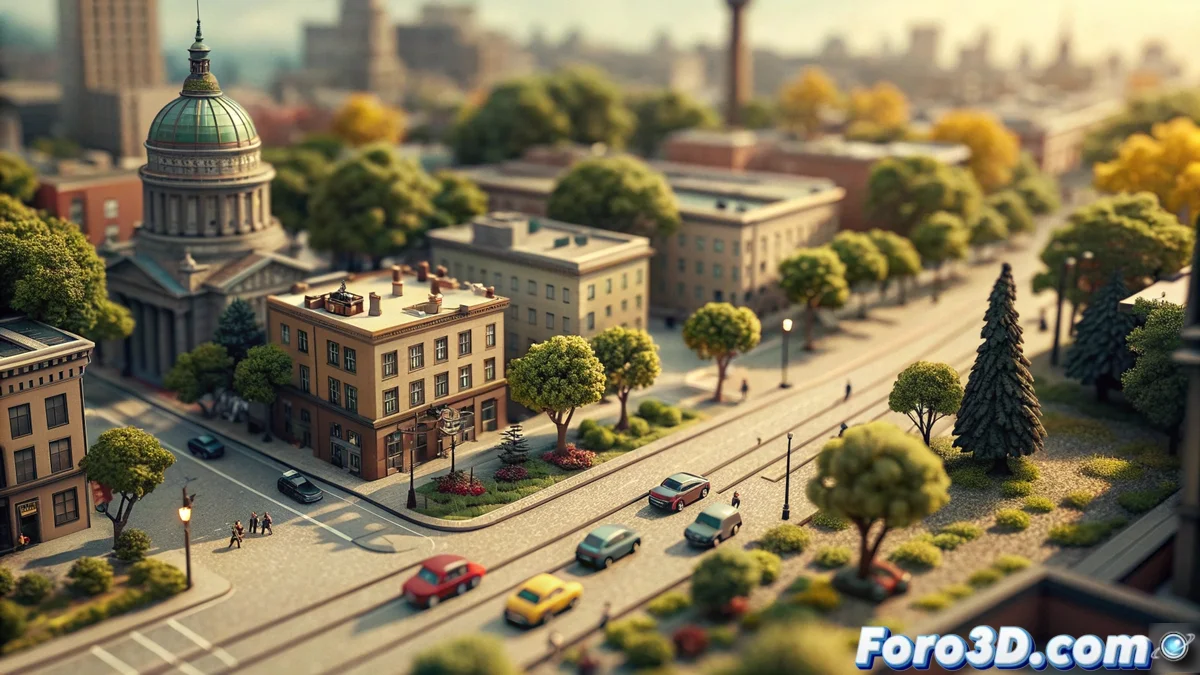
This post-processing technique manipulates a photograph so that the viewer perceives a full-scale scene as if it were a tiny scale model. It is based on applying a strategic blur and correcting certain color values. The final result deceives the eye, making urban landscapes captured from a certain height look like elaborate dioramas. 🏙️➡️🧩
Implementing the Characteristic Blur of the Effect
The fundamental step to create this optical illusion is to add two blur bands, typically at the top and bottom edges of the frame. Between them, a perfectly focused central strip is maintained. This specific pattern copies the extremely reduced depth of field produced by a real tilt-shift lens when photographing an object at close range. For the effect to be believable, the transition between the blurry areas and the sharp zone must be smooth and gradual.
Key Steps for the Blur:- Apply two blur masks at the ends of the image.
- Preserve a central horizontal band with total sharpness.
- Smooth the edges of the masks to achieve an imperceptible transition.
Selective blur is the main trick that turns the large into the small before our eyes.
Reinforcing the Illusion with Color and Contrast
Adjusting saturation and contrast is essential to complete the transformation. Normally, chromatic intensity is increased and differences between highlights and deep shadows are accentuated. This reproduces the lively and high-contrast appearance typical of professional maquettes under controlled lighting. These changes, combined with the previous blur, consolidate the sensation of observing a microworld and not a human-scale environment.
Recommended Color Adjustments:- Increase overall saturation for more vibrant colors.
- Enhance contrast to better define shapes and volumes.
- Adjust curves or levels to boost highlights and shadows.
Applying the Effect in Practice
The next time you contemplate a panoramic city view from an elevated viewpoint, you might imagine how to transform it into a digital maquette. Tools like Photoshop or GIMP offer filters and techniques to apply this process. Success lies in precisely combining the banded blur with an intense and contrasted color palette, thus blurring the line between reality and miniature. 🎨