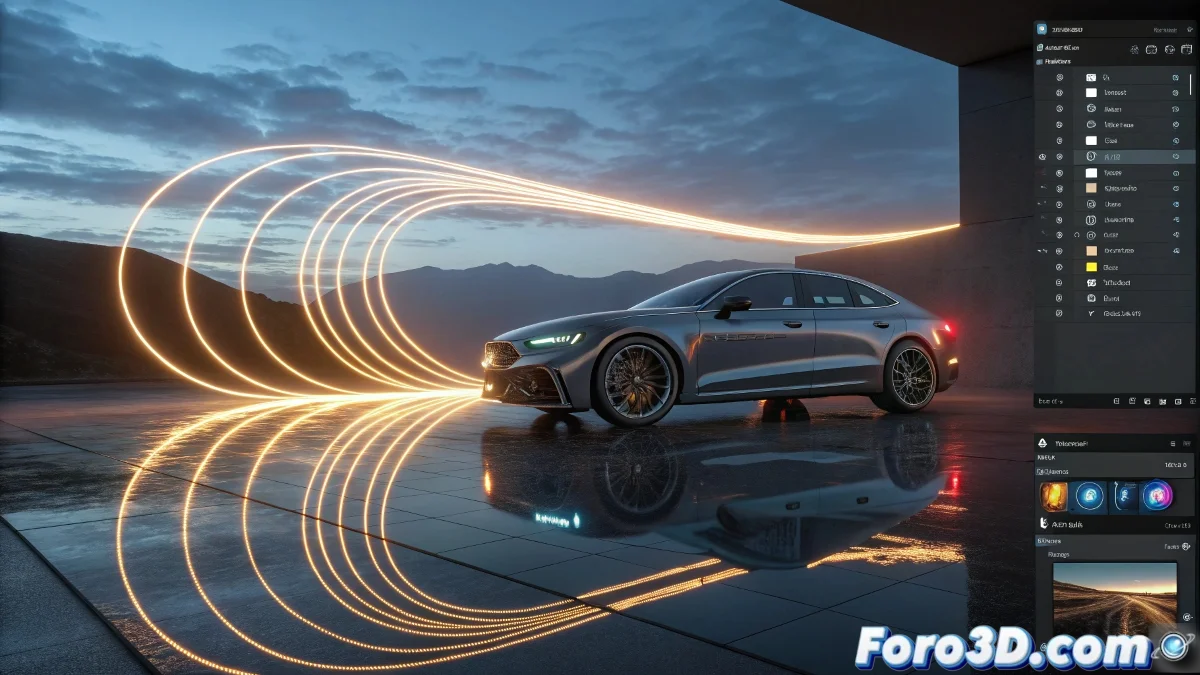
HDR Light Studio 9 Revolutionizes Lighting Design with Lumi-Curve: Hand-Drawn Light
Forget point lights: now you can draw the lighting like an artist. Lightmap has just released HDR Light Studio 9 with its innovative Lumi-Curve feature, transforming simple strokes into dynamic light sources that follow any imaginable shape. From ethereal halos to luminous trails for motion graphics, this tool puts creative power directly in your hands... or rather, in your cursor. ✍️💡
"Lumi-Curve is like having a magic brush that paints with photons instead of pigments" - Lightmap Team
From Technical Tool to Luminous Canvas
What began in 2009 as an HDRI generator is now:
- Lumi-Curve: Draw curves that turn into continuous light
- LightPaint 2.0: Intuitive positioning over 3D models
- Live connection with Blender, Maya, Cinema 4D and more
- Preset library for complex lighting effects
Why Are Artists Excited?
Lumi-Curve enables:
- Digital light painting: Luminous strokes with millimeter precision
- Curved horizons in synthetic HDRIs
- Organic lighting that wraps complex models
- Abstract effects for motion graphics
Revolutionized Workflow
The process is now:
- Draw your curve freely
- Adjust intensity and color
- See results in real time
- Export to your favorite 3D software
While other software keeps piling on sliders and parameters, HDR Light Studio 9 bets on direct creativity: if you can draw it, now you can light it. The question is: what will you draw first, a curvy sunset or your client's glowing logo? 🌅✨
P.S.: Early users report it's so addictive they've even tried "drawing light" in the real world... with predictably frustrating results.