Adobe Photoshop 26.1 has introduced a significant improvement in color gradient editing, now allowing adjustments directly from the contextual taskbar. Although this version doesn't bring a large number of changes, this feature streamlines and enhances users' workflow, making the gradient editing process faster and smoother.
Improvements in the Contextual Taskbar for Gradients
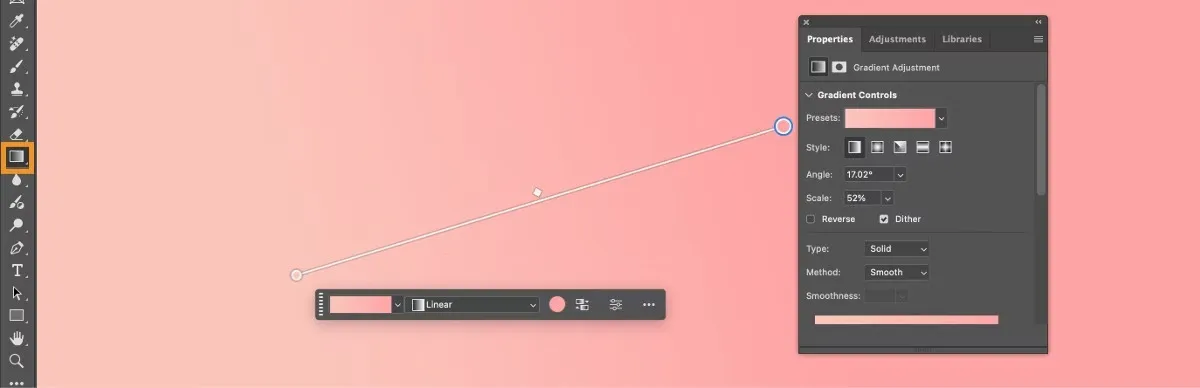
When selecting the Gradient tool, the contextual taskbar offers new controls that facilitate editing. Users can now:
- Select, toggle, or change gradient presets.
- Modify the gradient type, choosing from various available options.
- Invert the colors of the gradient preset with a single click.
- Edit the color and/or opacity of the gradient quickly and precisely.
Advantages of the New Contextual Taskbar
The incorporation of these controls makes gradient editing simpler and more accessible. Now there's no need to navigate through menus or additional panels, as all adjustments are available directly in the contextual taskbar, improving productivity and optimizing work time.
"With the new contextual taskbar, editing gradients in Photoshop has never been so efficient and accessible for graphic designers."
Smoothness in Working with Gradients in Photoshop
This improvement is especially useful for those who frequently work with color gradients in their projects, as it optimizes a process that could previously be more laborious. Now, with just a few clicks, detailed and precise adjustments can be made, allowing greater flexibility in creating complex visual effects.
In summary, the new feature in Photoshop 26.1 significantly improves color gradient editing through easy-to-use controls in the contextual taskbar. This update optimizes designers' workflow and offers a faster and more precise way to adjust gradients in their graphic projects.