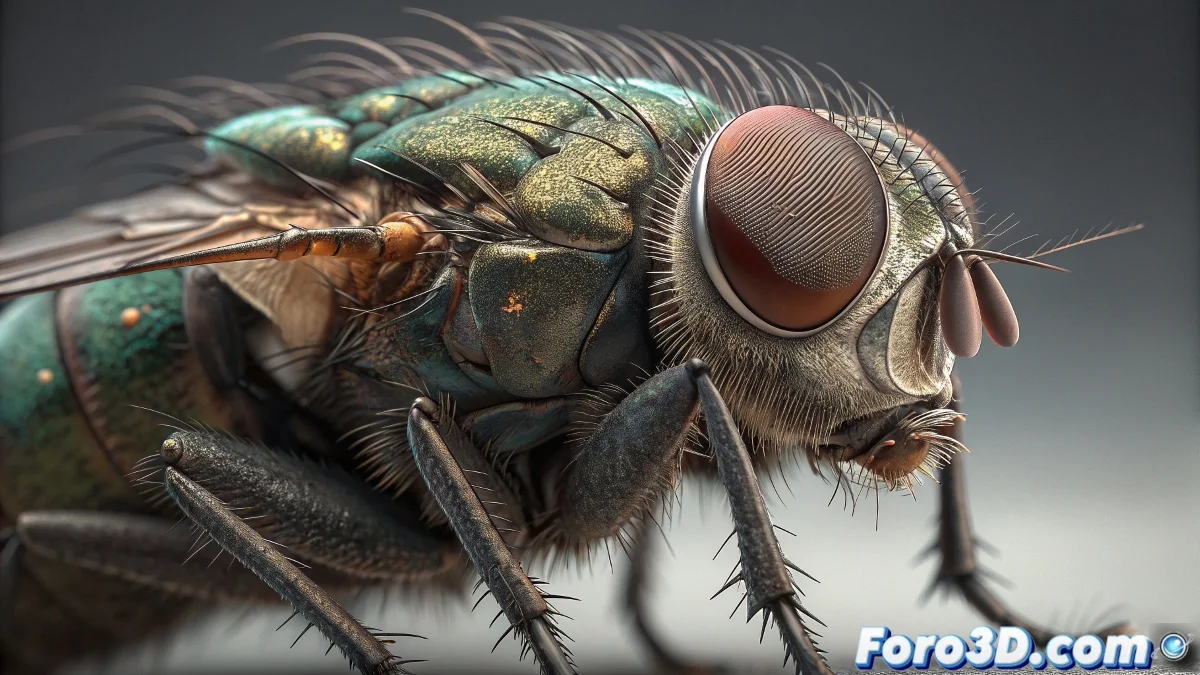
The Art of Creating Believable Digital Insects
When you face your first animated model in 3ds Max and decide to create a fly, you are tackling one of the most interesting challenges in organic modeling. Real flies have unique characteristics that require specific approaches to replicate them digitally. The transparent wings with their black vein patterns, the chitinous texture of the body, and those anatomical details that go unnoticed until you study them closely. Your observation about the black lines on the wings is perfectly accurate - they are the veins that give structure to the wing and are essential for realism.
Materials for Realistic Insect Wings
To create transparent wings with visible veins you need to intelligently combine different material channels. Transparency is controlled via the opacity channel, while the veins can be worked as bump or directly in the diffuse channel. The key is understanding that fly wings are not completely transparent like glass, but have a slight turbidity and specific reflections.
- Blend Material to combine transparency and veins
- Opacity maps with black and white vein patterns
- Reflection glossiness around 0.7 for natural reflections
- IOR of 1.2 to 1.3 to simulate thin membranes
Texturing the Insect's Head and Body
A fly's head presents specific characteristics that make it recognizable: large compound eyes, specialized mouthparts, and a chitinous surface with micro-details. Your idea of keeping eyes with a human touch might work for a more cartoonish style, but if you seek realism you'll need to approximate the real insect's anatomy.
Texturing a fly is like being a digital entomologist: every anatomical detail tells an evolutionary story
- Anisotropic materials for the chitinous shine of the body
- Bump maps for the segmented texture of the exoskeleton
- Compound eyes with hexagonal patterns and intense reflections
- Metallic colors like green or blue for the thorax and abdomen
Adding Hair and Final Details
Your idea of adding more hair at the joint between the head and body is anatomically correct and visually effective. Real insects have setae (sensory hairs) in these areas that help detect movement and air. In 3ds Max you can use Hair and Fur for specific areas or create geometry instancing for more detailed control.
Creating your first animated model is an important milestone in learning 3D 🐛. Every decision about materials and details brings you closer to understanding how small elements combine to create believable creatures that come to life through animation.