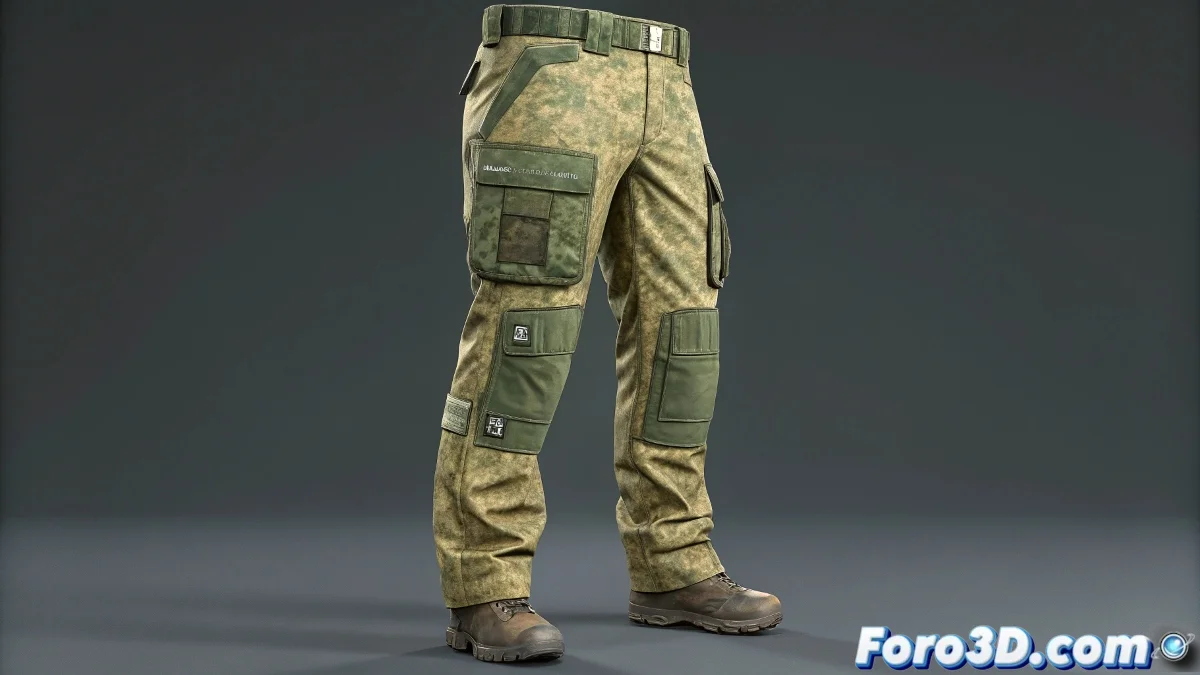
The Challenge of Digital Tactical Clothing
Simulating military pants with functional pockets in 3ds Max is like trying to tame a beast of fabric and seams 🎖️. These pants are not simple garments; they are complex systems where the base fabric must move flexibly while the cargo-style pockets maintain their characteristic volume and collide believably with the legs. The Cloth modifier becomes your best ally, but it requires meticulous mesh preparation and a deep understanding of fabric properties to prevent everything from turning into a jumble of deformations.
Mesh Preparation and Thickness Philosophy
The first step towards success is impeccable topology. Design the base mesh of the pants with support loops around the hips and thighs, ensuring extra density where the pockets will be sewn. For the simulation, always work with a single-layer version—without thickness—to avoid internal collisions that drive the solver crazy. The final thickness appearance is added later with a Shell modifier, once the simulation is baked and stable. Keeping the UVs well-organized from the start is crucial for texturing seams and patches later without distortion.
Simulating pants with thickness is like boxing with your eyes closed; you get hit from where you least expect it.
Pockets as Independent and Sewn Pieces
The key to pockets that behave as their own entities is to treat them as separate panels within the same Cloth system. Model each pocket with its flap and gusset, create vertex or edge groups, and use the Sew tool to virtually stitch them to the pants. This approach allows the solver to calculate tensions between the main panel and the pocket, making them wrinkle independently but connected, preserving that internal space so characteristic of cargo pockets.
Stiffness Control and Shape Preservation
Military pockets need more structure than the pants fabric. Assign a different fabric preset to the pockets, with higher values for Bend and Stretch to give them rigidity. Activate the Preserve Shape option and slightly increase the Damping to prevent them from collapsing in extreme poses. For specific areas like pocket flaps, use Cloth Groups with weight masks to anchor them so they maintain their shape, simulating the memory of reinforced fabric.
Strategies for Clean and Efficient Collisions
A stable simulation is synonymous with well-configured collisions. Use a low-resolution collision avatar for the body, simplifying the geometry of the hips and thighs. In the collision properties, reduce the Bounce, increase the Friction, and adjust the Offset to prevent pockets from sticking to or penetrating the pant leg. Increasing the solver's Substeps helps resolve complex contacts, especially when the leg bends or the character sits.
Workflow with LOD and Caching for Production
Efficiency is key in production. Simulate with a moderately dense mesh to speed up calculations and, once the movement is baked, apply a Turbosmooth or OpenSubdiv modifier to obtain the final detail. Use 3ds Max's Cloth Cache system or export the simulation in Alembic format to freeze the result. This allows you to reproduce the fabric animation stably in all phases of production, from layout to render, without having to recalculate the physics each time.
Texturing and Details that Sell Realism
The final look is defined in the texturing. Use Normal and Roughness maps to highlight seams, trims, and wear areas on the edges of pockets and pant legs. Subtle color variations between the different fabric panels reinforce the illusion that they are independent sewn pieces. For elements like ventilation mesh,