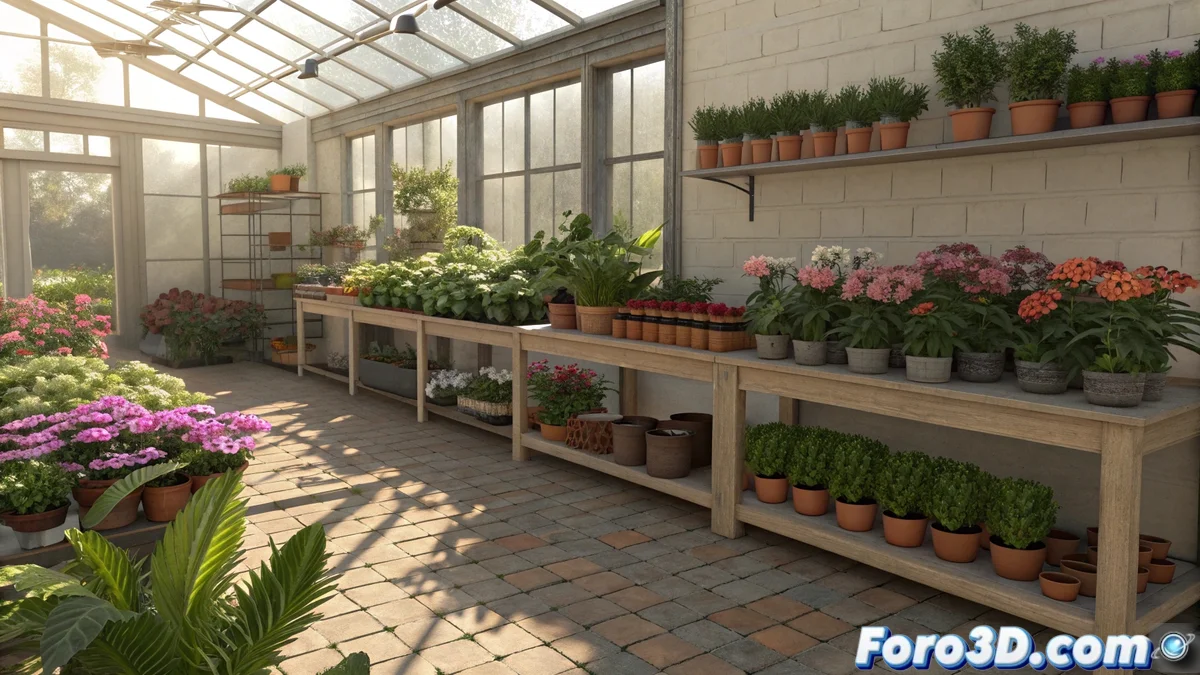
Building the Nursery Structure
To model a plant nursery in Blender 🌿, start by defining the main structure using basic primitives like cubes and cylinders. Block out the geometry for tables, shelves, pots, and the greenhouse structure if you include it. Apply subdivisions and modifiers like Bevel to smooth edges and Array to quickly duplicate pots and supports. Organize objects into separate collections: furniture, plants, decorations, and structure. This organization will facilitate not only the modeling but also the later application of materials and lighting.
Creating Realistic Vegetation with Plugins
Vegetation is the heart of the scene. Use specialized plugins to streamline the process:
- Botaniq: To add pre-configured realistic plants quickly
- Scatter: Procedural distribution of grass and small plants
- Foliage Generator: Creation of customizable leaves and branches
- Particles: To simulate scattered small flowers and grass
- Species Variety: Different heights, colors, and foliage densities
- Custom Pots: Plants in different growth stages
Botanical diversity makes the scene feel alive and authentic 🌸.
Texturing and PBR Materials
Apply physically accurate materials to achieve realism:
- Pots and Furniture: PBR materials with adjusted roughness and reflection
- Leaves and Vegetation: Shaders with translucency and subtle reflections
- Soil and Dirt: Visible dirt textures in pots and on the ground
- Additional Details: Labels, accumulated water, gardening tools
- Smart Combination: Bitmap and procedural textures to avoid repetition
- Optimization: Maintaining performance without sacrificing visual quality
The small details are what transform a good scene into an extraordinary one 🎨.
Natural Lighting and Final Render
The correct lighting is essential for the nursery atmosphere:
- Daytime HDRI: Natural sunlight entering through windows
- Area Lights: Soft light that accentuates plants and details
- Light Groups: Individual control of lights in Cycles
- Reflections: Light bouncing off surfaces and the floor
- Balanced Exposure: Highlighting details without saturation
- Depth of Field: Selective focus for a cinematic effect
Funny how you can spend hours setting up each leaf and pot, and in the end, the plants still don't water themselves
In the end, creating a plant nursery in Blender demonstrates how the combination of careful modeling, specialized plugins, and attention to detail can produce scenes of incredible realism. Of course, no matter how much 3D technology advances, there's still no plugin that waters the plants automatically... some things are still better in the real world 😅.