
Photoshop now rewrites reality with a couple of clicks
Gone are the days when photo editing required the patience of a monk and the skills of a Renaissance painter. Adobe's Generative Fill has turned Photoshop into a digital magic wand that makes objects disappear faster than your motivation on Monday morning. What once took hours of meticulous cloning now happens with a few clicks and a well-placed prompt.
"Generative Fill doesn't just edit photos - it rewrites reality with the enthusiasm of a kid with unlimited art supplies"
The magical process (that even your grandma could understand)
Activating this feature is so simple that even those who still call Chrome "the internet" can handle it. The contextual toolbar appears like magic, ready to turn your scribbles into masterpieces. It requires no precision - in fact, the clumsier your selection, the more fun the results can be.
- Freehand style selection: Draw as if you have Parkinson's and you'll still get decent results
- Smart removal: Make objects disappear like a mediocre kids' party magician
- Creative addition: Ask for a dinosaur and you'll get three versions of dinosaurs you never imagined
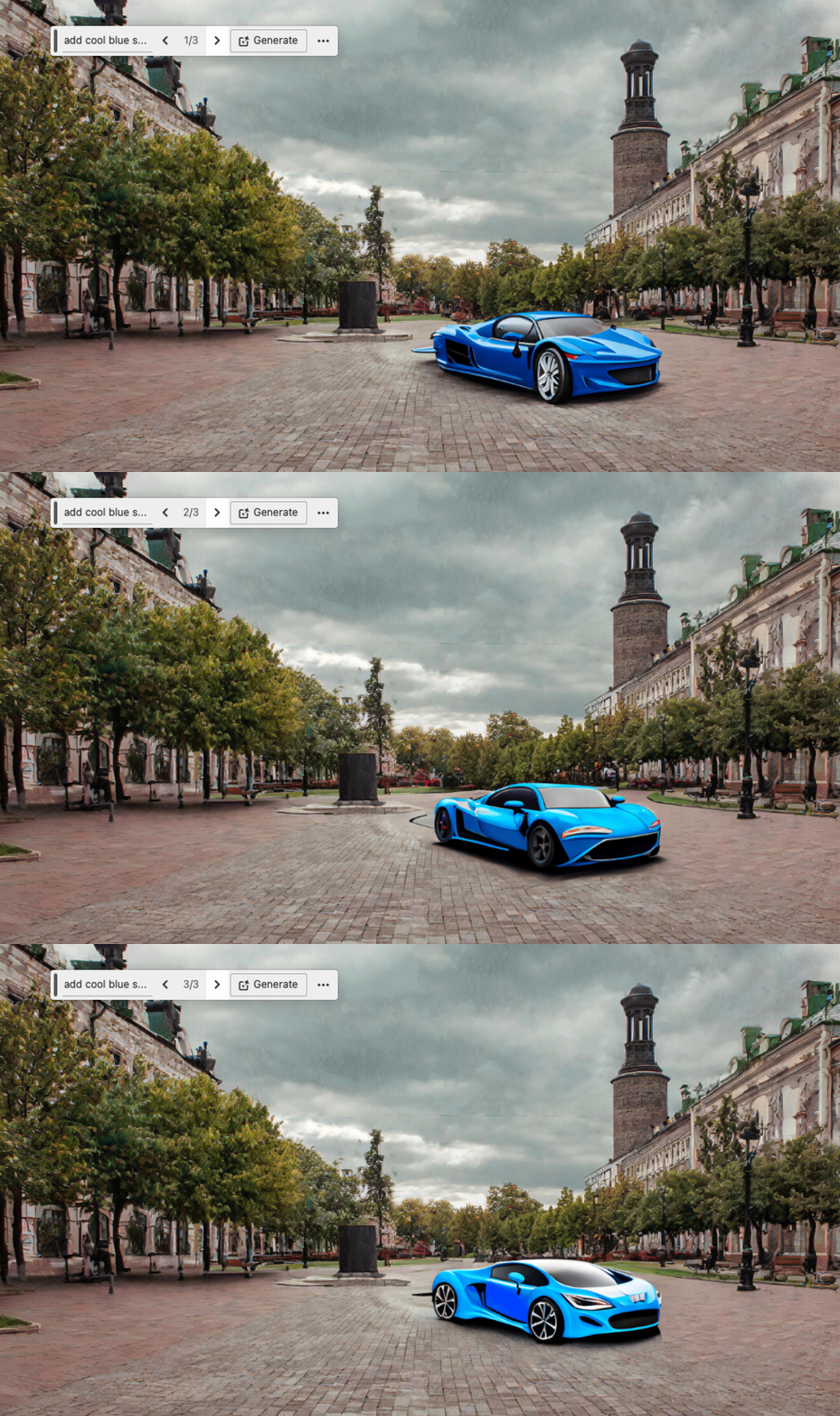
When AI becomes your accomplice in digital fantasies
The real magic happens when you let your imagination run wild in the text box. Want to replace that ugly building with a unicorn castle? Turn your boring selfie into a Renaissance portrait? Generative Fill will try with the enthusiasm of an art student under pressure. That said, sometimes the results look like they came from a fever dream.
The three options it always offers include: a decent version, an "interesting" version, and another that will make you wonder what substances the algorithms consume. But the beauty is that you can always ask it to try again, like that persistent friend who insists their startup idea is good.
Tricks to get the most out of this tool
For those who want to go beyond the simple "remove that guy from the background," here are some tips:
- Use specific but not too technical descriptions ("tropical beach at sunset" better than "coastal biome")
- Experiment with imperfect selections - sometimes mistakes give the best results
- Don't settle for the first generation - the third option is usually the most creative
Photoshop has evolved from a professional tool to a digital toy for adults. Now anyone can create impossible images, correct past mistakes, or simply add floating pizzas to their family photos. Image editing has never been so accessible... nor so potentially dangerous. Because with great editing power comes great responsibility (which we'll probably ignore) 🎨