A Tool to Streamline the Workflow
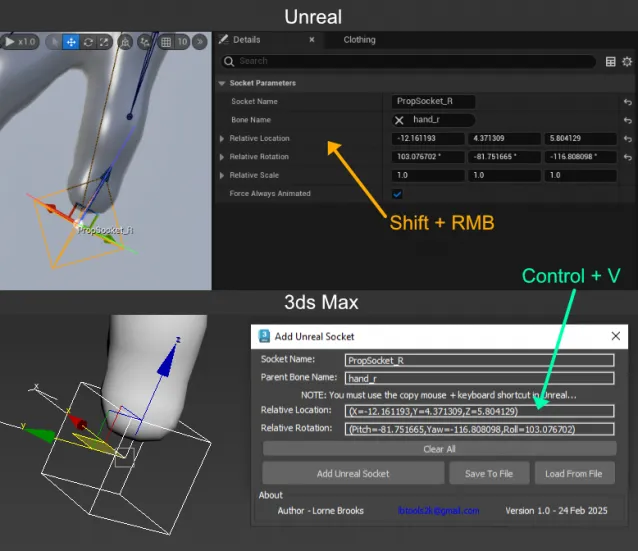
Developer Lorne Brooks has released Add Unreal Socket, a script for 3ds Max that simplifies the process of aligning and linking props to sockets in skeletons or meshes within Unreal Engine. This tool is designed to improve precision and reduce manual steps in rigging and animation.
Main Features
This script introduces a series of functions that facilitate integration between 3ds Max and Unreal Engine, allowing for more efficient data transfer.
- Copy and Paste Socket Data: allows extracting information directly from Unreal using a keyboard shortcut and applying it in 3ds Max.
- Automated File Management: saves and loads data into text files with names assigned according to the corresponding socket.
- Precise Linking: adds a link constraint to the helper, automatically setting the parent bone as the target and locking unnecessary transformations.
- Orientation Correction: adjusts the Y axis to improve coordinate conversion between both programs.
- Availability in Maya: also has a free version for Maya, accessible through Gumroad.
Installation and Compatibility
The installation process is simple and compatible with 3ds Max 2020-2025 versions. To install it, simply drag the MZP file into the viewport, which will automatically copy the files to the user folders. Once installed, the script is located within the LB Tools category in the 3ds Max panel.
An Essential Resource for Rigging and Animation
With this release, Add Unreal Socket positions itself as a key tool for artists and developers working with rigging and animation in Unreal Engine. Its ability to eliminate repetitive steps and improve precision in object linking makes it an indispensable ally in 3D content production.